 Fynchat
Knowledge Base
Teach the AI assistant your company facts (hours, policies, FAQs) so it answers from them accurately instead of guessing.
Why a knowledge base?
The AI assistant is good at wording, but it doesn't know your company's details on its own: your working hours, return policy, delivery areas, or fixed service prices. The knowledge base is where you enter these facts so the assistant relies on them in its replies — giving a correct answer instead of guessing or apologizing.
It is managed from the Knowledge base tab on the AI Chatbot settings page.
Structure of a single entry
Each fact is added as an independent card with these fields:
| Field | Purpose |
|---|---|
| Title | A short description of the topic (e.g., "Return policy"). |
| Content | The full text of the fact that the assistant reads. |
| Category | An optional group to organize entries (e.g., "Shipping", "Pricing"). |
| Priority | A number that sets the entry's importance; higher ones are preferred when information competes. |
| Active | A toggle to turn the entry on, or pause it temporarily without deleting it. |
How to add a fact
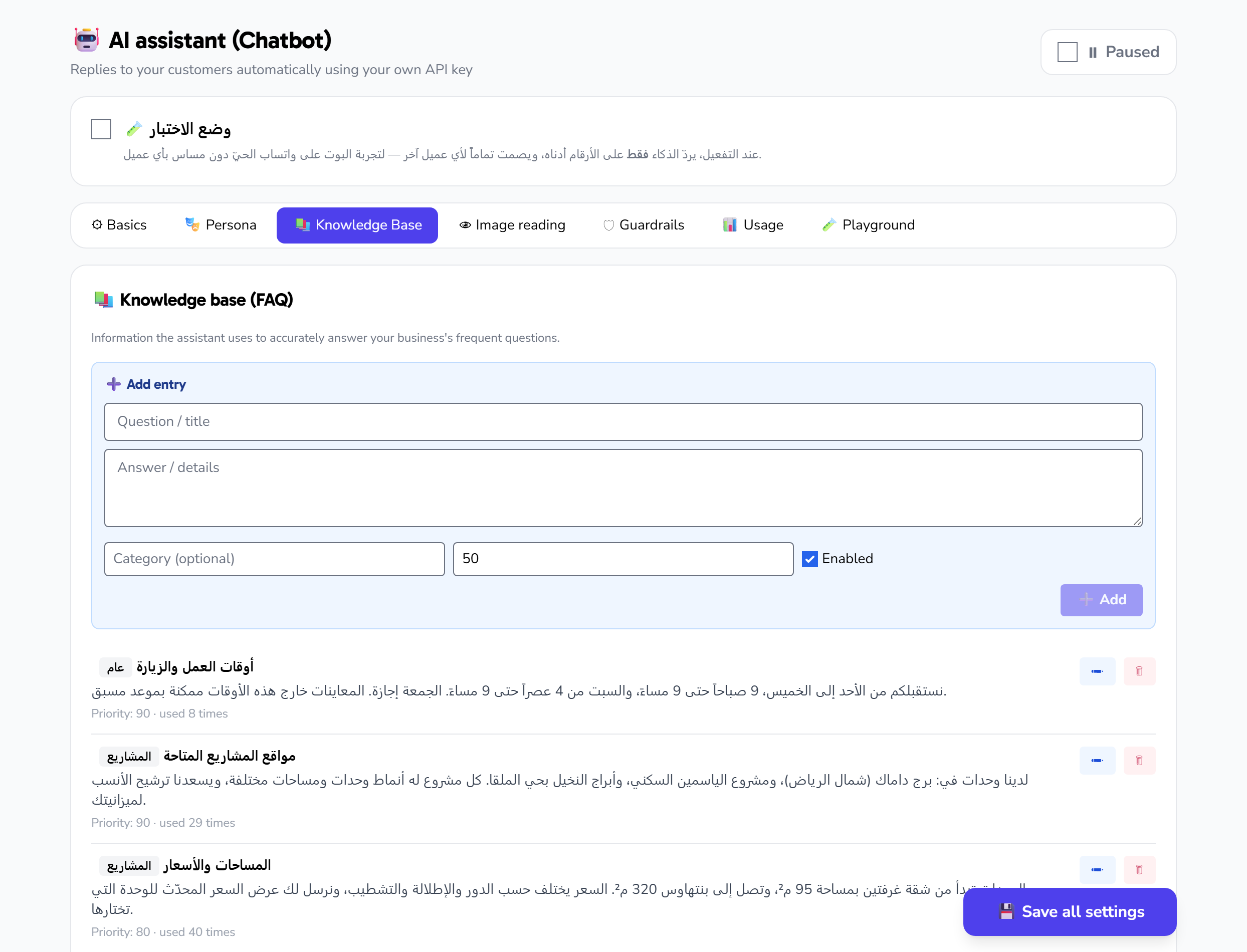
- Open the Knowledge base tab.
- In the Add information form, write the Title then the Content.
- (Optional) Add a Category and set the Priority.
- Leave Active on so the assistant takes it into account.
- Click Save. The entry appears in the list below the form right away.
To edit a fact, click the edit icon next to it, change what you need, then save. To remove it, click the delete icon.
What should you enter?
Focus on facts that come up repeatedly in customer questions and don't change often:
- Working hours, holidays, and official schedules.
- Return and exchange policy and warranty.
- Delivery areas, timing, and fees.
- Accepted payment methods.
- Frequently asked questions with their approved answers.
- Addresses, branch numbers, and website links.
- Business-specific policies (such as booking or viewing terms).
Tips for writing effective entries
- Keep each card to one topic. "Return policy" in one card and "Delivery areas" in another is clearer and easier to update than a single long card.
- Write in the customer's language, not internal jargon or abbreviations they won't understand.
- Be precise and specific: "Delivery within Riyadh in 24 hours for a 15 SAR fee" beats "fast delivery."
- Use priority to raise sensitive information (like prices and policies) above general facts.
- Pause instead of deleting: if a fact is seasonal (an offer that ends), turn it off to bring it back later easily.
- Update immediately when things change: every edit is reflected in the assistant's replies right away.
Relationship to tools
The knowledge base is for static facts you write manually. Dynamic data — like a product's availability, its current price, or an order's status — is fetched live by the assistant through the tools connected to your apps. The base and the tools work together: the base explains policies, and the tools answer real-time details. See the "AI tools and human handoff" article.