 Fynchat
Apps Gallery & Marketplace
How to browse Fynchat apps, start a free trial, subscribe, and cancel or resume your subscription — all from one page.
What is the Apps Gallery?
The Apps Gallery is the in-app marketplace inside Fynchat. From one place you add new capabilities to your account — an online store, bookings, support tickets, real-estate management, a car showroom — with no technical setup. Every app works directly with your WhatsApp number and your inbox.
Each app is independent: you try it free first, subscribe monthly only if it fits, and cancel whenever you like. You pay only for the apps you actually use.
How to reach the gallery
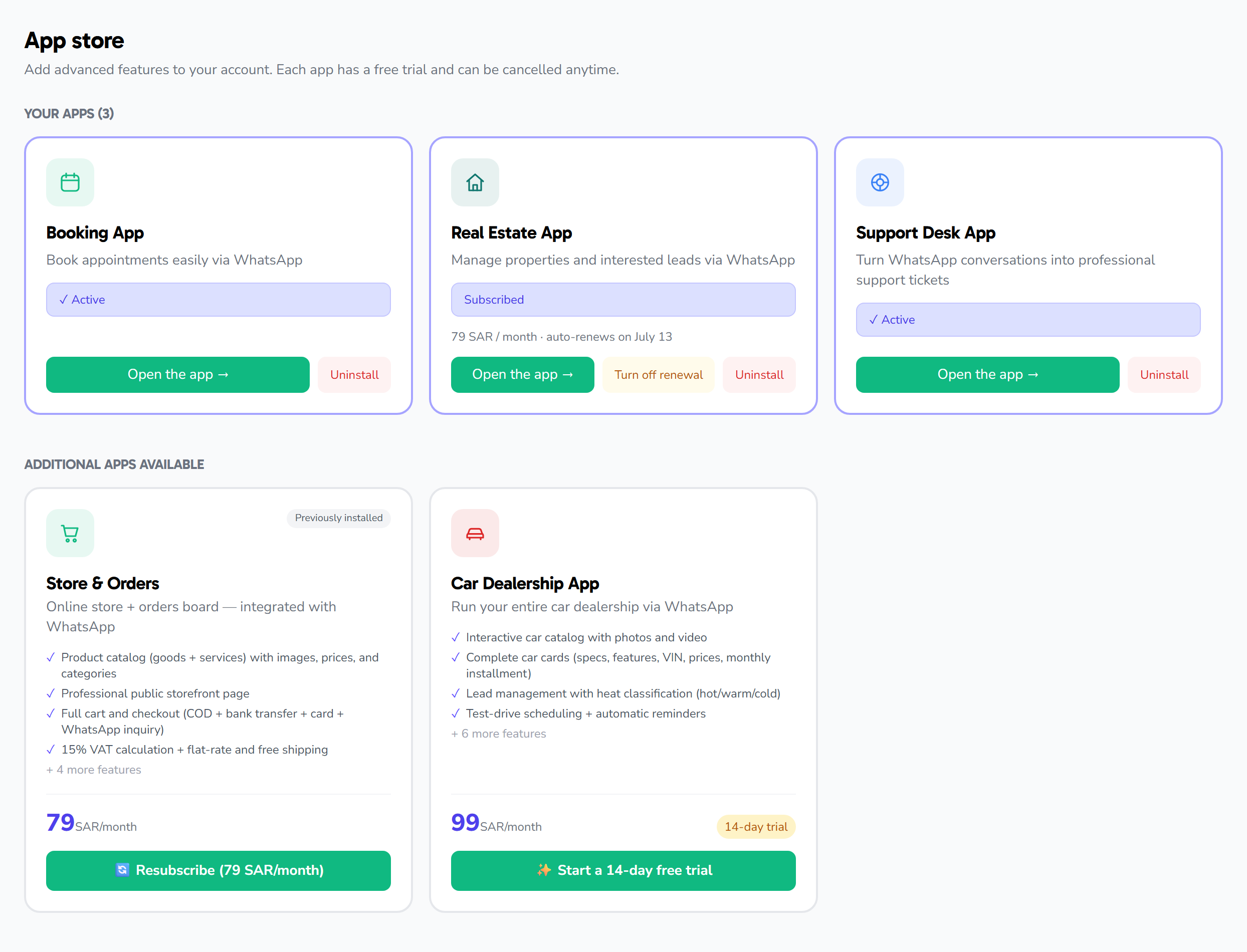
Open the Apps Gallery from the sidebar. You'll see cards for the available apps. Each card shows:
- Name and icon — a quick identity for the app.
- Tagline — one line summarizing its value.
- Category — such as "Commerce," "Productivity," or "Support," to help you filter.
- Free-trial length and monthly price.
- Your status — available to try, in trial, or subscribed.
Available apps
| App | Category | What it does | Free trial |
|---|---|---|---|
| Store & Orders | Commerce | Online store + orders board, built into WhatsApp | 14 days |
| Bookings | Productivity | Appointment booking over WhatsApp with confirmations and reminders | 7 days |
| Support Tickets | Support | Turn conversations into support tickets with SLA tracking | 14 days |
| Real Estate | CRM | Manage units, interested clients, and viewings | 7 days |
| Car Showroom | Commerce | Car catalog, leads, test drives, and financing | 14 days |
The current price and trial length appear inside each app's card. Open the app page to see its full feature set before you decide.
Starting a free trial
Every app begins with a free trial, no commitment. To start:
- Open the Apps Gallery and pick the app you're interested in.
- Review the features on the app page at
/apps/<app-slug>. - Click the start free trial button.
- The app activates instantly, and its icon appears in the sidebar so you can start using it right away.
During the trial you get every feature of the app at no charge. As the trial nears its end, we notify you so you can decide whether to subscribe.
Subscribing after the trial
If you like the app, turn on the monthly subscription to keep it active after the trial ends:
- From the app page in the gallery, click the subscribe button.
- Confirm the monthly subscription.
- The app keeps running without interruption, and billing is handled automatically each month.
Installation and billing are handled automatically — there are no technical steps on your side.
Canceling or resuming a subscription
You control your subscriptions at any time:
- Cancel: From the app page, click cancel subscription. The app stays available until the end of the paid period, then stops working. Your data (products, orders, settings) is not deleted.
- Resume: Return to the app page anytime and subscribe again; the app comes back with all your previous data exactly as you left it.
What happens when an app is installed?
- The app appears in the sidebar with a direct link.
- Its features and tools open inside your account (for example, the products page or the orders board).
- When supported, it becomes available to the AI assistant and automated replies, so it can perform the app's actions on your behalf over WhatsApp.
FAQ
Do I need a card to start the trial? The trial is free with no commitment; the paid subscription starts only when you choose to turn it on after the trial.
Can I install more than one app? Yes. Each app has its own billing and trial, and you can run as many as you need side by side.
If I cancel, do I lose my data? No. Canceling only stops the app; your data stays saved and returns when you resume.
How do I use an app with the AI assistant? Configure replies and assistant behavior from AI Assistant settings; supported apps add their capabilities automatically.