 Fynchat
Car Dealership App
A complete guide to running your dealership over WhatsApp — inventory, leads, test drives, the financing calculator, and trade-ins.
What is the Car Dealership App?
The Car Dealership app is an all-in-one solution that lets you run your entire showroom over WhatsApp. Instead of juggling scattered spreadsheets and lost conversations, it brings everything you need into one place:
- An interactive vehicle catalog with photos and video, plus a polished public link you can share with customers.
- Lead management with temperature tagging (hot / warm / cold).
- Test-drive scheduling with automatic reminders.
- A financing calculator to estimate the monthly installment.
- Trade-In with an automatic preliminary estimate of the customer's current car.
- Custom requests with automatic matching against your inventory.
- Editable auto-replies, fully integrated with WhatsApp.
Every interaction a customer starts on WhatsApp turns automatically into structured data in your dashboard.
The app comes with a 14-day free trial. For details and subscription, open the app page: /apps/car-dealership.
Activating the app and getting started
- Open /apps/car-dealership and activate the app (or start the free trial).
- From the dashboard, go to Settings to configure keywords, auto-replies, and the rest of the options.
- Add your first vehicle using the ➕ Add Vehicle button.
- Share your public catalog link with customers so interactions can begin over WhatsApp.
The dashboard (quick overview)
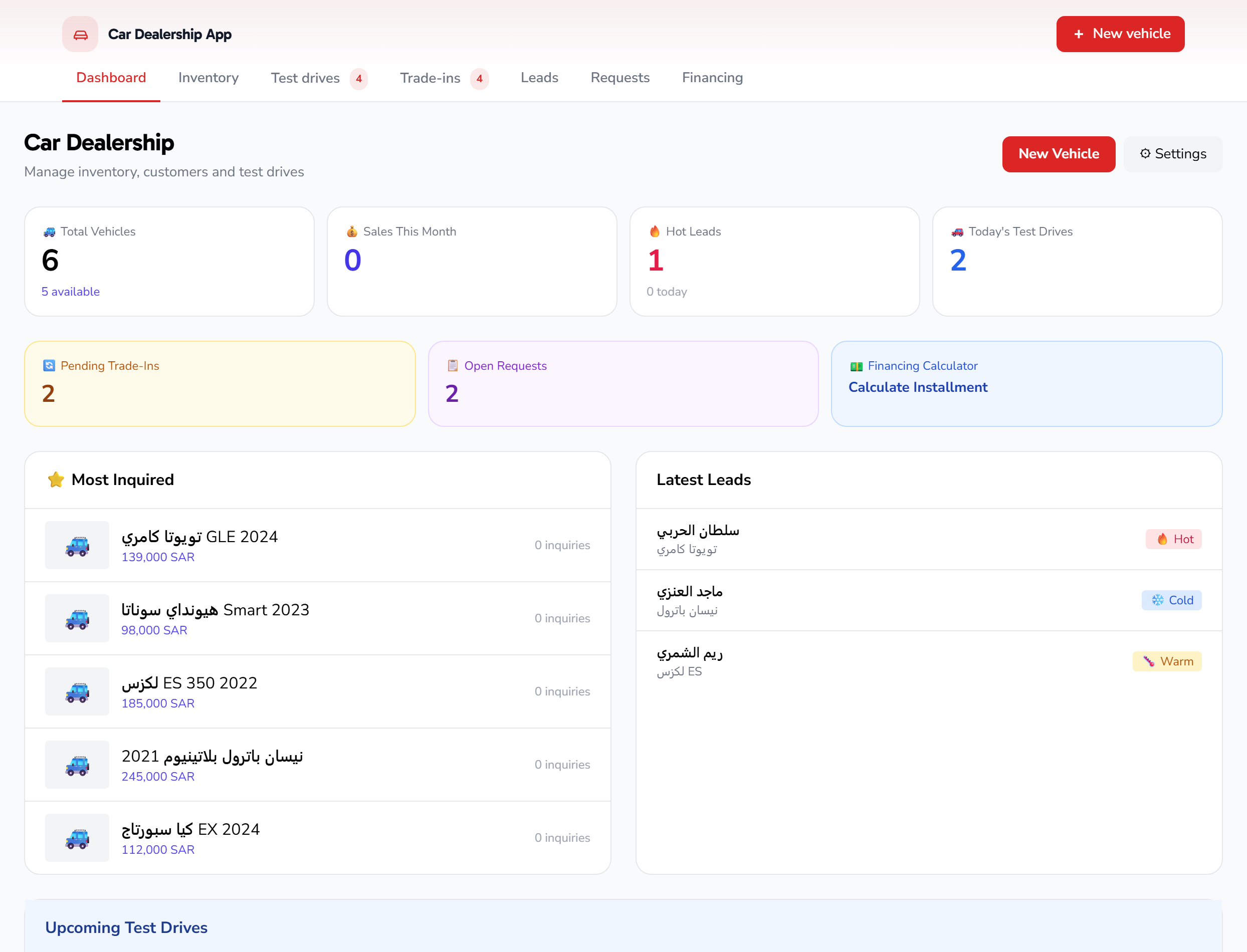
The dashboard shows the key KPIs at a glance, and every card is clickable to jump to the relevant section. At the top are two buttons: ➕ Add Vehicle and ⚙ Settings.
| Metric | What it means |
|---|---|
| 🚙 Total Vehicles | Number of vehicles in your inventory, with how many are available for sale |
| 💰 Sold This Month | Number of vehicles sold during the current month |
| 🔥 Hot Leads | Customers closest to buying, plus new leads today |
| 🚗 Test Drives Today | Appointments scheduled for the day |
| 🔄 Trade-Ins Pending | Trade-in requests awaiting your review |
| 📋 Open Requests | Custom requests that are still open |
| 💵 Financing | Quick shortcut to the financing calculator and bank partners |
The dashboard also shows your most-inquired vehicles, your latest leads, and upcoming test drives in a tidy table.
Inventory: managing vehicles
Inventory is the heart of the app. Every vehicle has a full card that appears in the public catalog and in your dashboard.
Adding a vehicle
From the dashboard, click ➕ Add Vehicle, then fill in the card details:
- Make, model, and year (e.g., Toyota Camry 2024).
- Price in Saudi Riyals.
- Photos and video — add clear images; the first photo is used as the cover.
- Specifications and features — transmission, mileage, color, condition, and any details that set the car apart.
- VIN (chassis number) when available.
- Estimated monthly installment, if you want to display it.
Once saved, the vehicle becomes available and customers can inquire about it right away.
The vehicle card
The vehicle card presents every detail in an organized layout: photos, price, specs, features, and the monthly installment. From within the card you can track the inquiry count for each vehicle to see what's most in demand, and update the status to Sold when the sale is complete.
The public catalog
Every dealership gets a polished public catalog link in the form /c/{dealership-name}/cars that you can share on WhatsApp or social media. The customer browses available vehicles, and when interested, starts a WhatsApp conversation with you directly — and is automatically logged as a lead.
Leads and requests
Every customer who inquires becomes a lead, complete with their name, phone number, and the vehicle they want (the desired make/model).
Temperature tagging
Tagging helps you prioritize:
- 🔥 Hot — very close to buying; follow up first.
- 🟡 Warm — interested but still comparing.
- 🔵 Cold — early in their search.
From the dashboard you can open the hot leads list directly to focus on the highest-value opportunities.
Custom requests and automatic matching
If a customer is looking for a car you don't currently stock, they can log a custom request specifying the make, model, year, and budget. The app performs automatic matching between requests and your inventory, alerting you when a matching vehicle arrives — so you can reach out at just the right time. Track open requests from the Requests section.
Test drives
A customer can book a test drive for a specific vehicle, which is logged in the Test Drives section along with their name and phone, the vehicle, the appointment time, and its status.
- Today's appointments appear as a KPI on the dashboard.
- The upcoming drives list shows all scheduled appointments in chronological order.
- The app sends automatic WhatsApp reminders to reduce no-shows.
You can configure the working hours and test-drive duration from the "Test Drive" tab in Settings (see below).
The financing calculator
The financing calculator helps a customer estimate their monthly installment before deciding, and helps you close the sale with clear numbers:
- The customer selects the vehicle.
- They enter a down payment and a financing term.
- The calculator displays the estimated monthly installment.
The calculator uses the default values you set in Settings (down payment, term, and APR), and you can also connect financing partners to streamline the process. You'll find the shortcut on the 💵 Financing card on the dashboard.
Estimates are for guidance only; final terms are subject to the financing provider's approval.
Trade-In
Trade-In lets a customer put their current car toward the value of a new one:
- The customer enters their car's details (make, model, year, mileage, condition) through a set of customizable questions.
- The app shows an automatic preliminary estimate of its value.
- The request reaches you under Trade-Ins Pending.
- You review the details and confirm the final valuation after inspection.
This flow speeds up the conversation and gives the customer an initial figure instantly, while keeping the final decision in your hands.
Interacting over WhatsApp
Everything above is fully wired into WhatsApp. When a customer messages you, the app can:
- Send them the catalog or a specific vehicle card.
- Start a test-drive booking.
- Run the financing calculator.
- Open a trade-in request.
- Log them as a lead and tag their temperature.
You can also connect the app to the AI Chatbot so it replies to customer questions automatically about vehicles, prices, and appointments. Configure the assistant's behavior from /settings/ai-chatbot.
Settings
Open ⚙ Settings from the dashboard. The page is split into five tabs across the top, and a Save All button at the bottom saves the changes from every tab at once (it shows "Saving…" while it saves). Here is every option in each tab.
"Keywords" tab
Lets you link keywords a customer sends to an automatic action the bot performs. Add as many rules as you like with the ➕ Add Keyword button; each rule has two fields:
- Keywords — one or more words separated by commas (,). When a customer's message matches any of them, the action runs.
- Action — a dropdown where you choose what the bot does on a match:
| Action | What it does |
|---|---|
| Send catalog link | Sends the customer the vehicle catalog link |
| Start test drive | Starts the test-drive booking flow |
| Start trade-in | Starts the trade-in flow and its valuation questions |
| Financing calculator | Runs the interactive financing calculator |
| Send location | Sends the dealership's location to the customer |
| Recommend cars | Suggests suitable vehicles from your inventory |
Each rule has a Remove button to delete it.
"Test Drive" tab
- Enable test-drive replies — an on/off toggle. When on, the bot handles test-drive booking replies automatically.
- Test-drive duration (minutes) — a number between 15 and 180 minutes (default 30). Sets the length of a single appointment.
- Test-drive working hours — for each day of the week (Saturday, Sunday, Monday, Tuesday, Wednesday, Thursday, Friday) you set a start time and an end time available for booking.
"Trade-In" tab
- Trade-in questions — the list of questions the bot asks the customer to collect and value their car's details (e.g., make, model, year, mileage, condition). Edit each question's text, add new ones with ➕ Add Question, or remove any with the trash icon 🗑.
"Financing" tab
-
Enable financing replies — an on/off toggle for the automatic financing-calculator replies.
-
Default down payment (%) — the down-payment percentage the calculator starts with (default 20%).
-
Default term (years) — the default number of repayment years (default 5).
-
Default APR (%) — the default annual percentage rate used in the calculation (default 5.5%).
-
Financing partners — a list of the banks/financing providers you work with. Each partner has four fields:
- Name — the bank or financing provider's name.
- APR — that partner's annual percentage rate.
- Max years — the longest repayment term the partner accepts.
- Min down payment (%) — the smallest down-payment percentage the partner requires.
Add a partner with ➕ Add Partner and remove any with the trash icon 🗑.
"Catalog" tab
- Enable catalog replies — an on/off toggle for the automatic catalog replies.
- Enable trade-in replies — an on/off toggle for the trade-in flow replies (shown within this tab).
- Catalog intro text — an introductory message sent with the catalog to the customer; edit it to match your dealership's tone.
- Show prices publicly — a checkbox; when on, vehicle prices appear in the public catalog.
- Show monthly payment — a checkbox; when on, the estimated monthly installment appears for each vehicle in the catalog.
Saving changes
After adjusting any tab, click the sticky Save All button at the bottom of the page to save all settings together.
Frequently asked questions
Is my inventory visible to the public? Only available vehicles appear in the public catalog via the share link. Sold or unavailable vehicles are hidden. You can also control whether prices and the monthly payment show, from the "Catalog" tab in Settings.
How do I know which vehicles are most in demand? The dashboard shows a most-inquired vehicles list based on the inquiry count for each vehicle.
Are the estimates (financing/trade-in) binding? No — all estimates are for guidance, and the final decision remains yours after review or inspection.
How do I turn off a specific auto-reply? Each flow (catalog, test drive, trade-in, financing) has its own enable toggle in its Settings tab; switch it off to stop that flow's automatic replies without affecting the others.
Where do I start? Activate the app from /apps/car-dealership, add your first vehicle, configure Settings, then share your public catalog link with customers.