 Fynchat
Upgrading and downgrading your plan
How to upgrade or downgrade your plan, and what happens to your data and subscription.
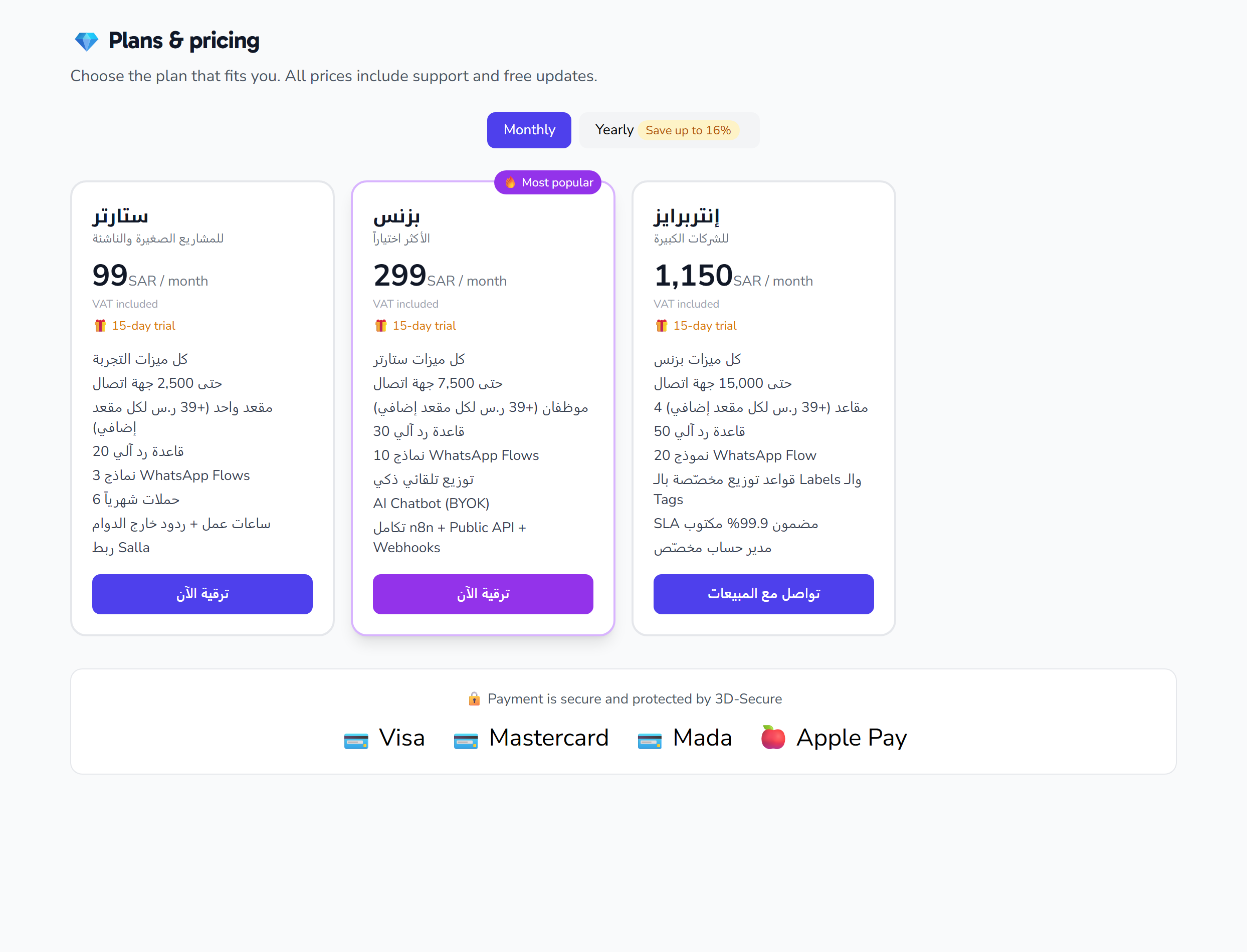
Upgrading to a higher plan
Steps
- Go to /upgrade
- Choose the plan that suits you
- Click "Upgrade now"
- Currently: this opens an email to contact sales (self-service payment coming soon)
When does the upgrade take effect?
- Immediately after payment is confirmed
- The new features and limits are activated right away
- You don't lose any data or settings
Billing
- We charge only the difference for the remaining days in the current month
- The following month is billed at the full new plan rate
Downgrading your plan
Important to know
- Downgrading does not delete your data
- However, you may exceed the new plan's limits (for example: you have 3,000 contacts and the new plan allows 2,500)
- In this case: you can't add new contacts, but your existing data is preserved
Steps
- Go to /upgrade
- Choose a lower plan
- Confirm the downgrade
When does it take effect?
- At the end of the current month (to avoid losing what you've paid for)
- There is no refund for the remaining days
Cancelling the subscription entirely
Steps
- Account → Billing → Cancel subscription
- Choose a reason (it helps us improve)
- Confirm the cancellation
After cancellation
- The account remains active until the end of the paid month
- After that: it switches to "suspended"
- Your data is kept for 90 days to allow you to return
- You can't send messages during this period
- You can sign in and view your data
- After 90 days: permanent deletion of the account and its data
Restoring a suspended account
Within 90 days after cancellation:
- Sign in
- A "Your account is suspended" page will appear
- Click "Reactivate" + choose a plan
- The account returns exactly as it was, with all its data
Invoices
How do you receive invoices?
- An automatic email at the start of each month
- A PDF copy saved under Account → Billing → Invoices
Changing the billing address
- Account → Billing → Billing information
- Edit the company name, tax number, and address
- The change applies to future invoices only
Meta costs are separate
⚠ Reminder: The Fynchat subscription is independent of Meta's costs for sending messages. If you cancel Fynchat, you'll continue paying Meta for active conversations.
Common issues
"I upgraded but the new features didn't appear"
Clear your browser cache, or sign out and back in.
"I want a custom plan above Enterprise"
Contact sales at [email protected] — we offer enterprise plans with a custom SLA.
"My account was suspended by mistake"
Contact [email protected] within 24 hours.