 Fynchat
Snapchat lead ads
Connect your Snapchat lead forms so every new lead arrives within seconds as a contact and an open WhatsApp conversation, with real conversions reported back to Snapchat.
The problem it solves
Snapchat has no messaging API, so a lead who fills in your form sits in the Snapchat dashboard until someone opens it and calls. The difference between calling in one minute and calling two hours later is the difference between a deal and a lost one.
This integration makes the lead arrive within seconds, signed: the contact is created automatically and a WhatsApp conversation opens immediately.
Find it under Settings → Lead ads.
Setup in four steps
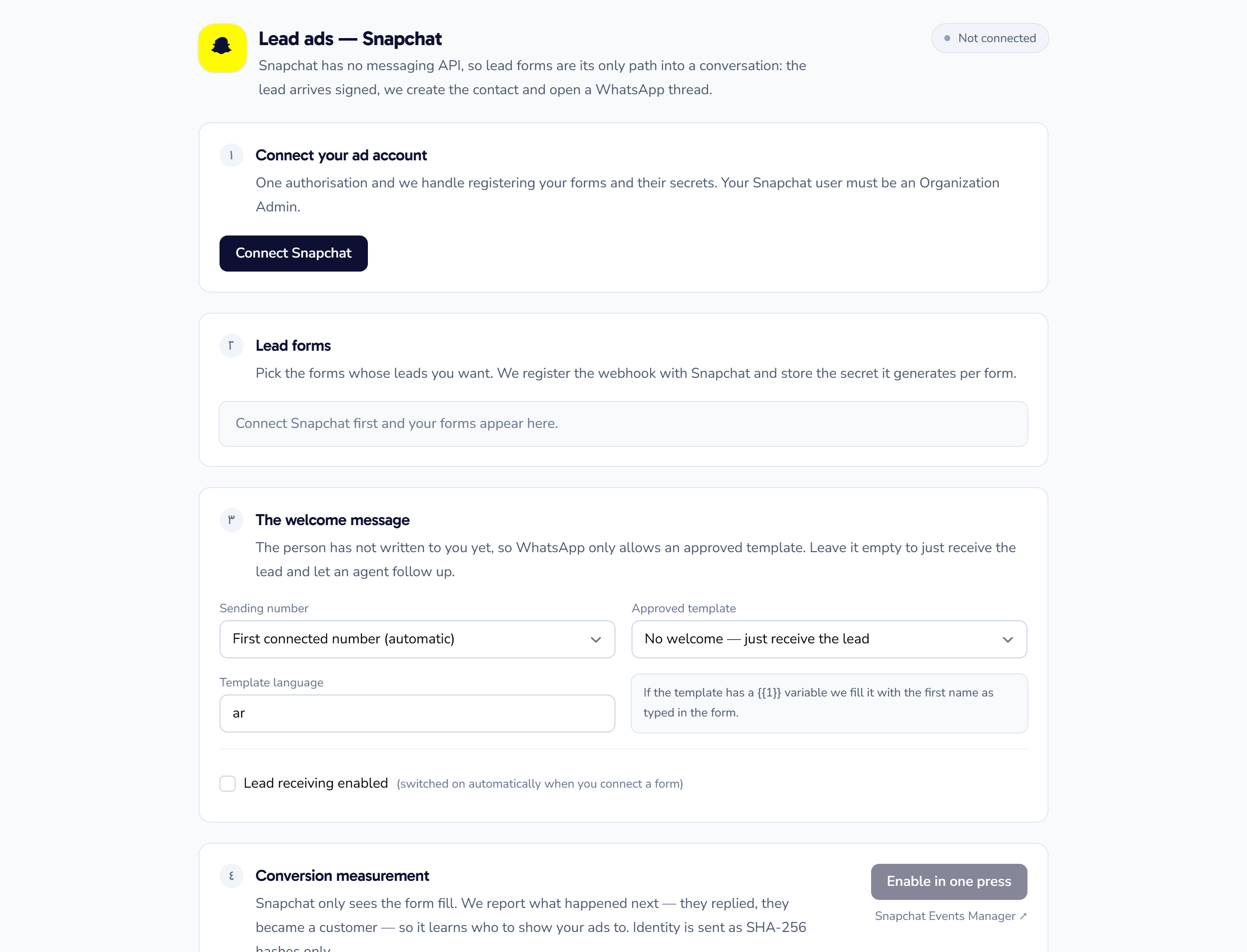
1) Connect your ad account
Click Connect Snapchat and complete a single authorisation. After that we register the forms and their secrets for you — no key is ever copied by hand.
Your Snapchat user must be an Organization Admin.
2) Pick your lead forms
Once connected, your forms are listed and you choose which ones to receive. We register the webhook with Snapchat and store the secret it mints per form.
3) Configure the welcome message
This is where most setups go wrong: the person who filled in the form has not messaged you yet, and WhatsApp only allows you to open a conversation with an approved template.
| Field | What goes in it |
|---|---|
| Sender number | The WhatsApp number the message goes out from (or the first connected number, automatically) |
| Approved template | An approved WhatsApp template for the welcome |
| Template language | The language of that approved template (e.g. ar) |
If the template has a {{1}} variable, we fill it with the first name exactly as the lead typed it in the form.
Leave it empty if you would rather just receive the lead and have an agent follow up personally.
Then switch on lead intake (enabled automatically when you connect your first form).
4) Turn on conversion tracking (strongly recommended)
By default Snapchat only sees the form submission, so it has no idea which lead became a real customer — which is how budget gets spent on an audience that fills forms and never buys.
With this step we report back what happened after the form — the lead replied, the lead became a customer — so Snapchat's algorithm learns who to show your ad to.
- Click Fetch pixels after connecting, then choose your pixel.
- Choose the event that represents "lead replied" (e.g.
CUSTOM_EVENT_1). - The event is sent automatically, once, for each lead who replies on WhatsApp.
Privacy: the lead's identity is sent SHA-256 hashed only — no phone number or email leaves in the clear.
Once it is running
- Every lead appears in Contacts tagged with its ad source.
- Its conversation shows up in the inbox like any WhatsApp chat — the AI assistant, automated replies and routing all apply.
- You can test any form with the Test button before launching the ad campaign.
Common problems
| Symptom | Most likely cause |
|---|---|
| No forms appear after connecting | The Snapchat user is not an Organization Admin |
| Lead arrives but no message is sent | No approved template chosen, or the language does not match the approved one |
| Message arrives without a name | The template has no {{1}}, or the lead left the name field empty |
| Conversions never show in Snapchat | The pixel was not fetched, or no event was selected |