 Fynchat
Webhooks
Register external HTTPS endpoints that Fynchat calls when platform events fire — signed with HMAC-SHA256, with a live test, delivery logs, and secret rotation.
What are Webhooks?
Webhooks let your external systems be notified in real time when events happen inside Fynchat. You register an endpoint — an HTTPS URL on your side — and the platform calls it with a POST request whenever an event you subscribed to occurs (a new message, an order, a booking, a support ticket, and so on).
Each endpoint is made of three things:
- A name (optional) for identification.
- A target URL that receives the events.
- One or more subscribed events from the platform's fixed list.
On creation, the system generates a signing secret that is shown once, and every delivery is signed with HMAC-SHA256 so you can confirm it really came from Fynchat.
For each endpoint you can:
- Send a synchronous test ping and see the result instantly.
- Open the delivery logs and retry failed ones.
- Rotate the secret.
- Enable/disable the endpoint or delete it.
You'll find the feature under Settings → Integrations → 🔔 Webhooks at /settings/integrations?tab=webhooks. The legacy link
/settings/webhooksredirects there automatically. The tab itself is visible on every plan, but creating and managing endpoints requires a plan that includes the Webhooks capability (see the next section).
Plan gate and endpoint limit
The Webhooks feature is gated behind the webhooks plan capability. The tab opens on any plan, but if yours doesn't include the capability you see a locked 🔒 panel with an upgrade button (/upgrade), and the create button is disabled.
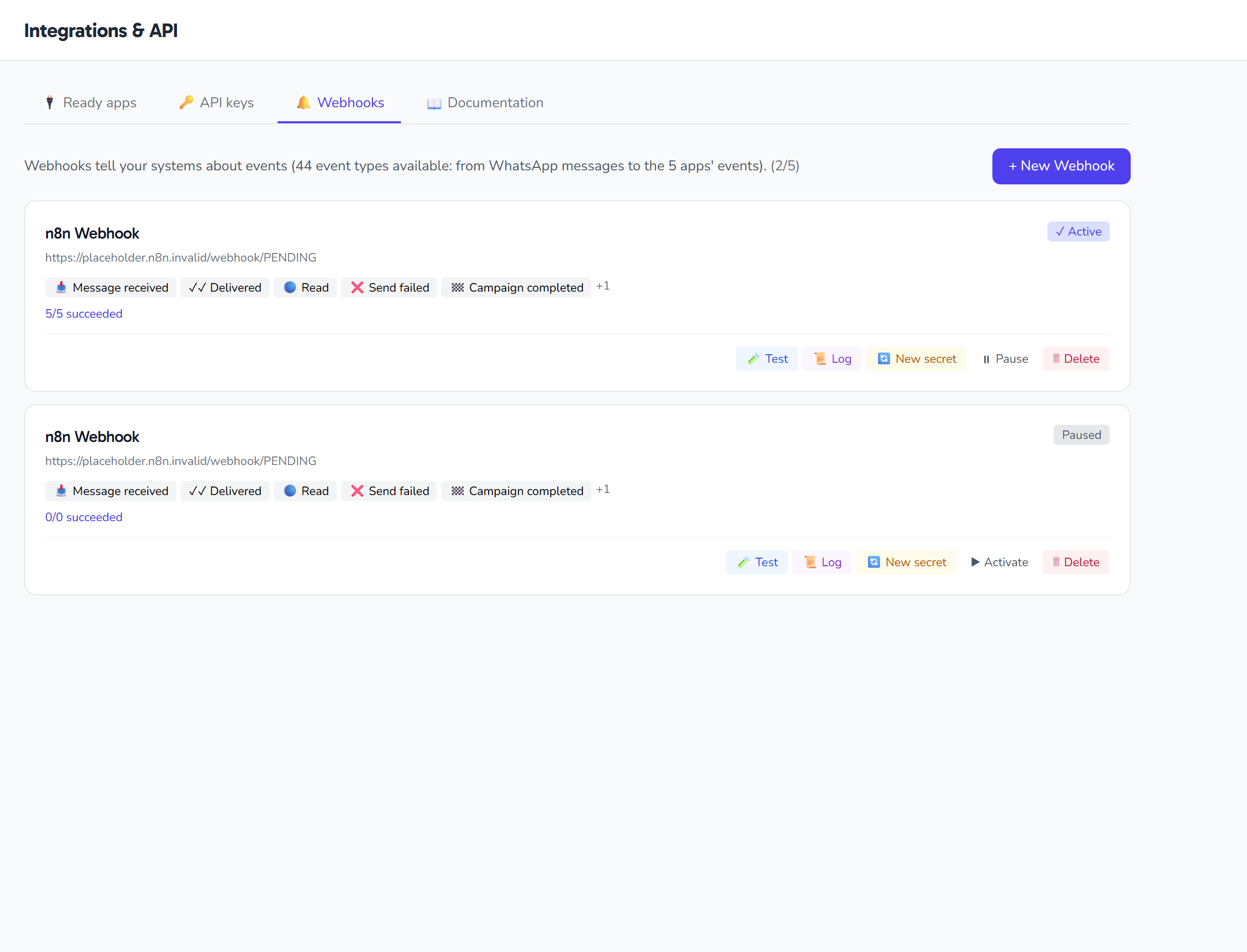
At the top of the list, a used/maximum counter is shown (e.g. 2/5) for capped plans:
| Plan | Endpoint limit |
|---|---|
| Business | Up to 5 endpoints |
| Enterprise | Unlimited (no cap shown) |
Creating an endpoint
Click the create button to open the form, and fill in:
| Field | Required? | Notes |
|---|---|---|
| Name | Optional | Free text up to 120 characters; when left empty, a fallback name is shown in the list |
| URL | Required | A valid URL up to 500 characters, and it must be a public HTTPS address (the PublicHttpsUrl rule). Example: https://yourdomain.com/wa-webhook |
| Events | Required (at least one) | Tick one or more events from the grouped checkboxes. Each selected event is validated against the platform's fixed event list on save |
After you save, the endpoint is created active right away, and you see the message: "Webhook created. Save the Secret now — it won't be shown again."
Supported events
Events are organized into families and validated against a fixed list inside the system. Subscribe to one or more specific events from the list:
| Family | Domain |
|---|---|
message.* |
Messages (e.g. message.received, message.sent) |
contact.* |
Contacts |
campaign.* |
Campaigns |
template.* |
Templates |
booking.* |
Bookings and appointments |
order.* / product.* |
Store (orders and products) |
property.* / viewing.* / real_estate.* |
Real estate and viewings |
vehicle.* / test_drive.* / trade_in.* / car_dealership.* |
Car dealership |
ticket.* / request.* |
Support tickets and requests |
ai.* |
Artificial intelligence |
subscription.* / trial.* |
Subscription and trial (e.g. trial.ending_soon) |
The signing secret and signature
After creation (or after a rotation), the secret is shown only once in a banner with a copy button and a warning that it won't appear again — save it immediately. Its format is whsec_ followed by 48 random characters, and it is stored as a hidden field that never appears in listings.
Every delivery (as well as the test ping) is signed with HMAC-SHA256 of the request body using the secret, and carries these headers:
| Header | Value |
|---|---|
X-Fyntra-Event |
The event type (e.g. webhook.test) |
X-Fyntra-Signature |
sha256= followed by the HMAC-SHA256 signature of the request body using the secret |
X-Fyntra-Delivery-Id |
A unique id for each delivery (test pings start with test_) |
Verify the signature before any processing. Example in PHP:
$body = file_get_contents('php://input');
$sig  = $_SERVER['HTTP_X_FYNTRA_SIGNATURE']; // "sha256=..."
$expected = 'sha256=' . hash_hmac('sha256', $body, $YOUR_SIGNING_SECRET);
if (!hash_equals($expected, $sig)) { http_response_code(401); exit; }
Rotating the secret
The Rotate secret button asks for confirmation, then generates a new secret and shows it once in a banner. The action is recorded in the account audit log as a webhook.secret_rotated event. After rotating, update the secret in your system immediately.
Testing an endpoint (Test)
The Test button sends a synchronous POST request to your URL containing {"event":"webhook.test", ...} (its text: "This is a connection test from Fyntralink"), with a 15-second timeout. The result appears instantly in the interface:
- The HTTP status code
- The latency (in milliseconds)
- The response body
The request is signed with the same headers above, so it's a practical way to confirm that your endpoint receives and verifies the signature correctly before you rely on it.
Delivery logs and retry
Unlike the synchronous test, real platform events are delivered through a background job (queue). The Logs button opens a modal listing the delivery attempts, 30 per page, newest first:
| Column | Meaning |
|---|---|
event_type |
The event type |
status |
The status: success / pending / failed |
response_status |
The HTTP response code from your endpoint |
created_at |
The time of the attempt |
Any delivery whose status is not success shows a Retry button next to it, which re-sends the same event with its original id, type, and payload.
The endpoint card (read-only)
Each endpoint's card shows its status and stats:
- The URL and an Active/Inactive badge.
- A red failure badge that appears when the failure count exceeds 5.
- Up to 5 chips for the subscribed events, with a +N indicator when there are more.
- A success/total delivery counter; "total" = all deliveries, and "failed" = those that were sent but did not return a 2xx status.
Tip: make your endpoint return a 2xx status after receiving; any response outside the 2xx range is counted as a failed delivery.
Enable, disable, and delete
- Enable/disable: a single button flips the endpoint's state; its label switches with the state, and the card badge reflects it. Message: "Webhook enabled." or "Webhook disabled."
- Delete: asks for confirmation, then permanently deletes the endpoint. Message: "Webhook deleted."
Quick tips
- Save the secret as soon as it appears — it won't be shown again; and if it's lost, use Rotate secret.
- Verify
X-Fyntra-Signaturebefore processing any request. - Return 2xx so the delivery isn't counted as failed.
- Use the Test button to confirm your endpoint before relying on it.
- Watch the red failure badge and the delivery logs, and retry failed ones when needed.