 Fynchat
Automation & workflows
Design visual drag-and-drop automations that start on a trigger and run conditions and actions over your WhatsApp conversations, with ready-made templates, AI generation, and a sandbox tester.
What is Automation & workflows?
Automation & workflows is a full visual automation tool for building paths that run automatically over your WhatsApp conversations. You'll find it at /settings/workflows.
Every workflow starts with one fixed trigger (the front door), then branches through conditions, actions, and flow nodes that the system lays out as a diagram.
The feature has two pages:
- The list page — shows all your workflows and lets you create new ones.
- The builder — a drag-and-drop canvas for building the workflow's logic.
The list page
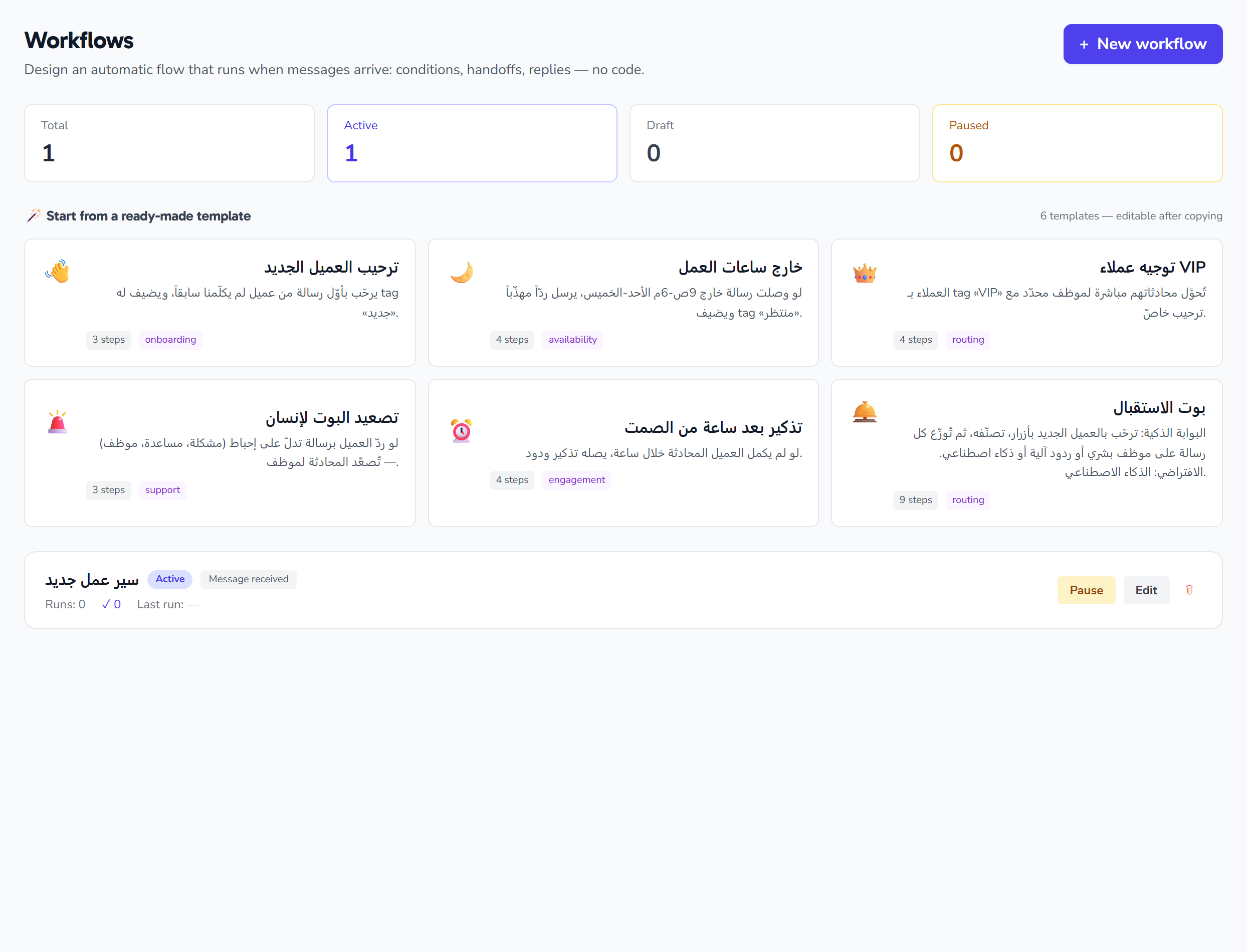
At /settings/workflows you'll find:
- A stats strip — total, active, draft, and paused counts.
- A ready-made templates strip (optional) — prebuilt workflows you can clone with one click.
- The workflow list — each row shows the name (a link to the builder), a status badge, a trigger badge, run/success/error counters, the last-run time (relative), an inline status toggle, an edit link, and delete.
- A "+ New" button — opens the create-workflow modal.
Creating a workflow
Click "+ New", then fill in:
- Workflow name — free text (required to enable the Create button). If you leave it blank it takes the default name "New workflow", with a 160-character maximum.
- Trigger type — choose from four fixed options:
| Value | Label | When the workflow starts |
|---|---|---|
message_received |
Message received | When a message arrives |
keyword |
Keyword | When a keyword comes in |
button |
Button | When a button is pressed |
new_conversation |
New conversation | When a new conversation starts |
The modal's default type is Message received. After creation, the workflow opens straight in the builder.
You can also instantiate a ready-made workflow directly from the templates strip (see below).
The builder
The builder is a drag-and-drop canvas with three columns:
1. The node palette
A side column listing draggable node types, grouped into four categories:
| Category | Role |
|---|---|
trigger |
Deliberately hidden from the palette so the fixed front-door trigger can't be swapped |
condition |
Branches the workflow based on a condition |
action |
Performs an action (send, assign…) |
flow |
Controls the execution path |
Node metadata and descriptions come from the server.
2. The canvas
The drawing area: pan and zoom, a minimap, dragging nodes, connecting them with labeled edges, and snap-to-grid.
3. The inspector
A column that renders a config form for the selected node, built from its config schema. Supported field editor types:
| Field type | What it does |
|---|---|
text / url |
Text or a URL |
number |
A number |
textarea |
Long text |
select |
A dropdown of options |
tags |
Multiple tags |
weekdays |
Weekday selector (7 round buttons, starting on Sunday) |
buttons_list |
Reply-button list — max 3, each with a label and a payload |
key_value |
Key/value pairs (add, edit, remove) |
select_template |
Pick an APPROVED WhatsApp template from your tenant's templates — stores the template's numeric id |
select_user |
Pick a user by id (e.g. to assign to an agent) |
Any unknown field type renders an error note instead of an editor.
Node edges and branch labels
Nodes are connected by edges on the canvas, and each edge carries a label used for branching. Recognized labels are color-coded on the source handles:
| Label | Color | Meaning |
|---|---|---|
yes |
Green | The "yes" branch |
no |
Red | The "no" branch |
default |
Gray | The default branch |
timeout |
Orange | Timeout |
On save, the system validates the graph: it rejects dangling edges, rejects two edges with the same label from the same node, and detects cycles. To delete an edge, click it.
The builder's top bar
The top bar includes:
- The name — editable inline.
- A status badge and a dirty (unsaved-changes) indicator.
- ⚡ Show as button — (standard workflows only) exposes the workflow as a function button an agent can press mid-conversation. Saved in the trigger config with a default ⚡ icon.
- 🤖 AI tool — (standard workflows only) lets the AI call the workflow as a tool mid-conversation.
- Pause / activate.
- AI-generate.
- Sandbox tester.
- Save.
Status toggle (active / paused)
There are three statuses: draft, active, and paused. Toggle it from the list row or the top bar. You can't activate a workflow with no trigger node, and you can't pause the reception bot.
AI-generate
Prompts you for a natural-language description, then asks the backend to generate the workflow definition and imports the returned nodes and edges onto the canvas (with possible warnings).
Sandbox tester
A modal that runs the saved workflow against a fake inbound message you type, in dry-run mode: actions are simulated and nothing is actually sent. It returns a per-node, step-by-step trace and tints the canvas nodes green/red/gray. It requires a linked WhatsApp account.
Ready-made templates
The list page has a strip of clonable templates, each with an icon, name, description, node count, and category. Clicking a template instantiates a ready-made workflow from it on the spot.
Deleting a workflow
You can delete from the list rows or from the builder inspector (a per-node delete for non-trigger nodes). The system workflows (reception and intake) cannot be deleted.
Additional notes
- Workflow description (up to 500 characters) and priority (an integer from 1 to 9999, starting at 10 on creation and governing dispatch ordering) are saved with the workflow, but there's no visible input field for them on these two pages.
Permissions & plan: Managing workflows (create / edit / status toggle / delete) is available to admins only, and every workflow is scoped to your tenant. Each plan has a maximum number of workflows: trial 1, Starter 3, Business 10, Enterprise unlimited. The system workflows reception and intake are protected: reception can't be paused, and neither can be deleted.