 Fynchat
Bot Monitor
A live page that shows every active bot conversation and its stats in real time, letting you take over any conversation from the bot with a single click.
What is the Bot Monitor?
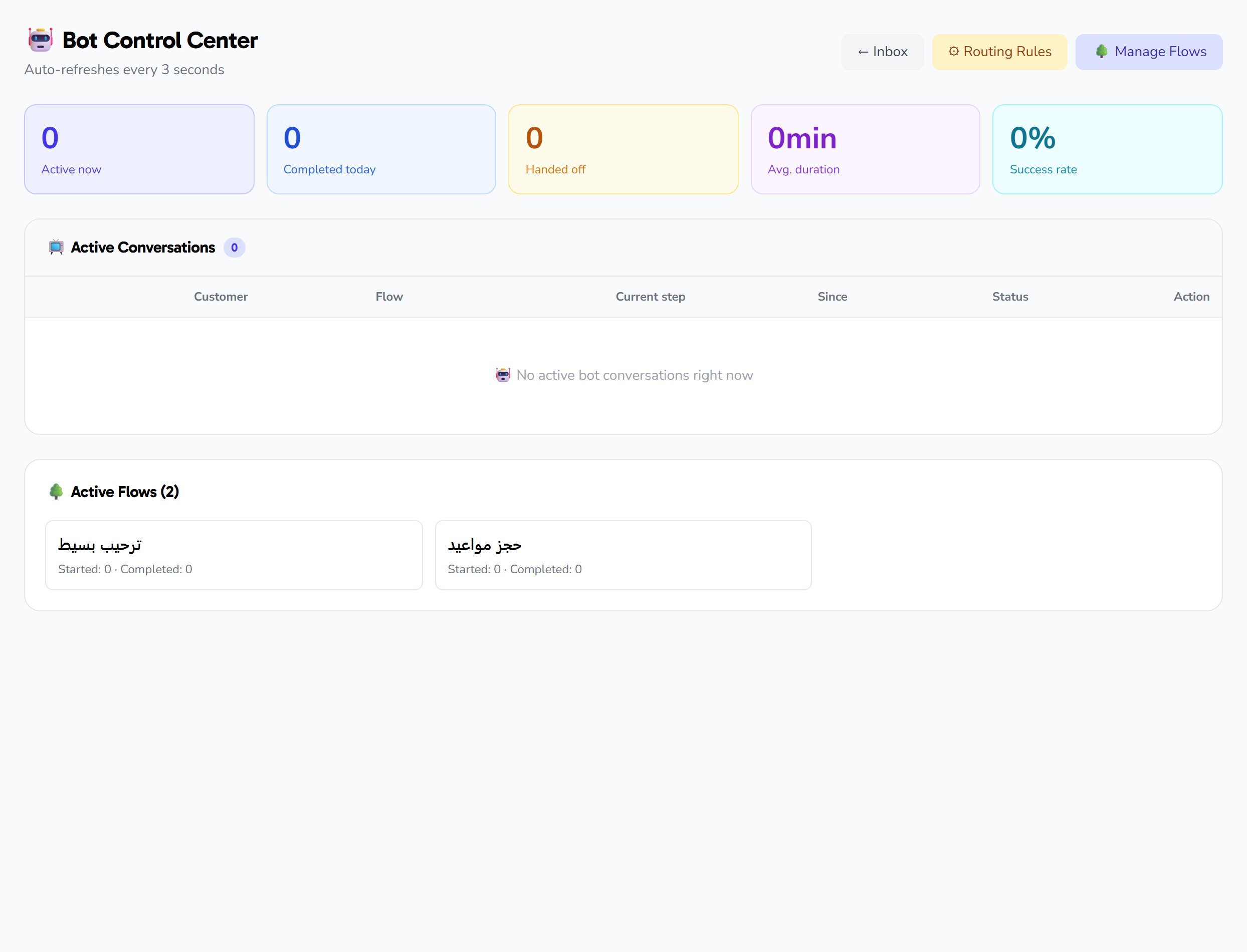
The Bot Monitor is a live monitoring page at /inbox/bot-monitor that shows you, in real time, every conversation the bot is currently handling: who the customer is, which flow they are moving through, which step they stopped at, and how long since they last moved — along with a quick stats row at the top of the page and a snapshot of your active flows' performance. If you spot a conversation that needs a human touch, you take it over from the bot in one click and it moves into your queue in the inbox.
The page refreshes automatically every 3 seconds without pressing any button, so the numbers and the list in front of you stay continuously up to date.
Navigation from the top of the page
At the top of the page there are three buttons for quick navigation:
- Inbox → /inbox
- Routing Rules → /inbox/routing-rules
- Auto-reply Flows → /auto-replies/flows
The stats row
A row of five tiles summarizes the bot's performance:
| Tile | What it shows |
|---|---|
| Active | The number of bot conversations currently active |
| Completed today | The number of conversations the bot finished with a "completed" status today |
| Handed off today | The number of conversations handed off to a human agent today |
| Average duration (min) | The average duration of bot conversations that ended today, in minutes (rounded to one decimal) |
| Success rate | The percentage of completed conversations out of all ended conversations over the last 7 days (%) |
The live active-conversations table
The heart of the page is a table showing up to 50 active conversations, ordered by most recently active. A badge next to the table title shows the number of rows displayed. Each conversation has the following columns:
| Column | Content |
|---|---|
| Contact | The customer's name (or "no name" if not recorded) and the phone number in international format with a + prefix |
| Flow | The name of the bot flow the conversation is running (or — if none) |
| Current node | The step the conversation stopped at, with its type in parentheses |
| Last activity | How long since the conversation last moved (now / N minutes ago / N hours ago) |
| Status | A badge summarizing the conversation's state (see below) |
| Take over | A button to take the conversation over from the bot |
If there are no active conversations, the table shows an empty message instead of rows.
Status badges
The "Status" column summarizes each conversation's state with a colored badge:
| Badge | When it appears |
|---|---|
| Stale | When more than 3 minutes have passed since the last activity — shown in rose |
| 📌 Off-script | When the customer strays from the expected flow (the off-script counter is above zero) — shown in amber |
| On-track | The normal state, the conversation is moving as expected — shown in emerald |
Taking a conversation over from the bot
The primary action on the page is the Take over button next to each row. When you click it:
- A confirmation dialog appears mentioning the customer's name (or their number).
- On confirmation, the conversation is assigned to you and taken out of the bot's hands.
- You are automatically taken to the conversation inside the inbox (/inbox) to continue the reply yourself.
- A confirmation message appears: "The conversation has been taken over. It's now in your queue."
Use this button whenever you see a stale conversation, one that is off-script, or any case that needs a human touch.
Active flows snapshot
At the bottom of the page there is a grid of cards for each active bot flow, each card showing:
- The flow name
- The number of starts
- The number of completions
- The completion rate (%) computed as completions ÷ starts
This snapshot gives you a quick picture of which of your flows customers actually finish and which ones stall.
Auto-refresh
The page reloads only the conversation list and the stats every 3 seconds automatically, preserving your scroll position and page state — so there is no refresh button and no manual reload needed.
Important notes
- The table shows up to 50 conversations only. The badge next to the table title counts the displayed rows, whereas the "Active" tile counts all active conversations with no cap — so the two numbers can differ when active conversations exceed 50.
Access to the Bot Monitor may depend on your plan and permissions.