 Fynchat
Importing & exporting conversations
Migrate your old WhatsApp chat history into the platform from export files, and download a complete, re-importable ZIP of your contacts and conversations.
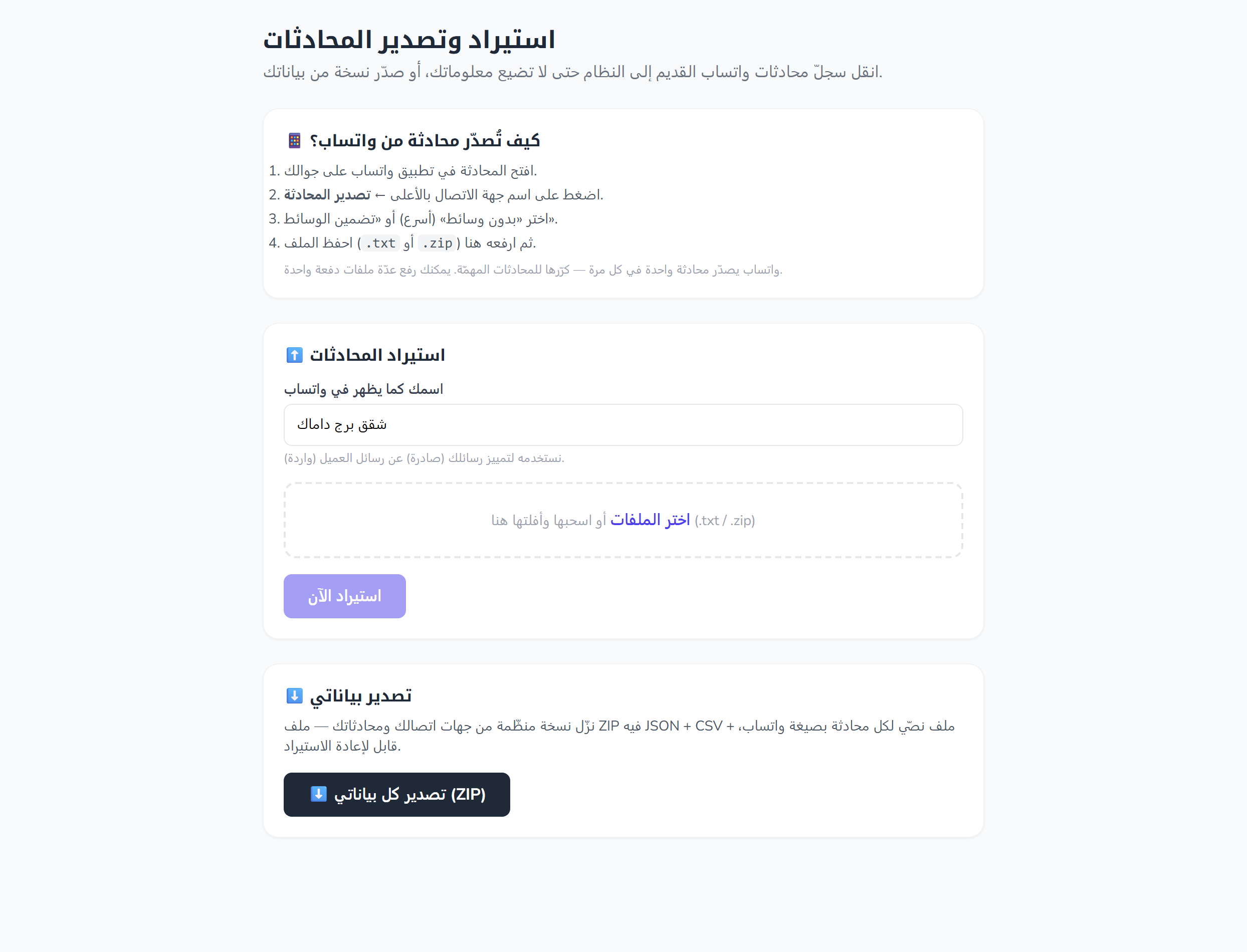
What is this page?
The Importing & exporting conversations page (/settings/chat-import) does two things:
- Import: move your old WhatsApp chat history into the platform, so the contacts and messages appear inside your account.
- Export: download a complete, organized copy of your contacts and conversations in a single ZIP file.
Imported conversations are stored under your organization's active WhatsApp account.
Access: this page is available only to a signed-in user whose email is verified. All data is scoped to your organization. You must already have a linked WhatsApp account; otherwise you'll see the error "No WhatsApp account is linked to your account yet".
Step one: export the chat from your phone
Before importing, you need a WhatsApp export file. The page shows step-by-step instructions for getting one from the WhatsApp mobile app. In short:
- Export one chat at a time from the WhatsApp app.
- WhatsApp gives you two options: "Without media" produces a text file (
.txt) with the messages only, while "Include media" also adds the attachments. Both formats (.txtand.zip) are accepted here. - Transfer the resulting file to your device, then upload it on this page.
When you upload a
.zipfile, only the entries ending in.txtare read from it.
Import conversations
Fields
| Field | Description |
|---|---|
Your name as it appears in WhatsApp (owner_name) |
A required free-text field (up to 120 characters). We use it to tell your own messages (outgoing) apart from the customer's (incoming). It's pre-filled with your organization's name, or your own name if the organization has none. |
Files (.txt / .zip) |
Your WhatsApp export files. You can select several at once via the button or by drag-and-drop. |
How to import
- Open /settings/chat-import.
- Check the Your name as it appears in WhatsApp field (auto-filled; you can edit it).
- Choose your export files with the "Choose files" button, or drag and drop them onto the dashed area. A "📎 {n} file(s) selected" counter appears.
- Click "Import now" — it changes to "Importing…" while processing.
The import button stays disabled until you fill in the owner name and select at least one file.
Upload limits
| Limit | Value |
|---|---|
| Accepted formats | .txt and .zip |
| Max files per submission | 60 files |
| Max size per file | 50 MB (51200 KB) |
Inside a .zip |
Only entries ending in .txt are read |
.zip archive guards |
Up to 50 MB per entry and 200 MB for the whole archive; at most the first 200 entries are scanned. Any entry larger than the limit is skipped, and the import is aborted if the archive exceeds the total limit. |
After importing
On success, a green banner appears, for example: "✅ Imported {chats} conversation(s) — {messages} message(s) — from {files} file(s)." The selected-files list is then cleared automatically, ready for another batch.
If some files couldn't be imported, the message gets a "Failed:" note followed by up to the first three errors. Validation errors (owner name, or the number/size of files) appear beneath the relevant field.
Export all your data
Click the "⬇️ Export all my data (ZIP)" link to download an organized copy of your contacts and conversations in a single ZIP that contains:
- a JSON file,
- a CSV file,
- and one text file (
.txt) per conversation in WhatsApp format.
The bundle is re-importable through this same page. The file is named whatsapp-manager-export-YYYYMMDD-HHMMSS.zip, and it's deleted from the server right after it's sent to you.
Common problems
The "Import now" button is disabled
Make sure you've filled in the Your name as it appears in WhatsApp field and selected at least one file; the button stays disabled unless both are true.
"No WhatsApp account is linked to your account yet"
Import stores conversations under your organization's active WhatsApp account. Link a WhatsApp account first, then try again.
A file wasn't imported
- Make sure the file is a
.txtor.zip. - Inside a
.zip, only files ending in.txtare read. - Make sure the file isn't larger than 50 MB, and that you're not uploading more than 60 files at once.
Quick tips
- Set Your name as it appears in WhatsApp to match the name shown in the export file, so your outgoing and incoming messages are labeled correctly.
- Export one chat at a time on your phone, then upload them all together (up to 60 files).
- Use the "Without media" option if you only want the text messages and a faster upload.
- Keep a periodic ZIP export of your data; it's re-importable whenever you need it.