 Fynchat
Comments on your posts
Bring TikTok and Instagram comments and Google Maps reviews into one place, reply publicly or privately, classify them, and automate replies with general or single-post rules, with an option to stop the rules after a match.
What is the Comments section?
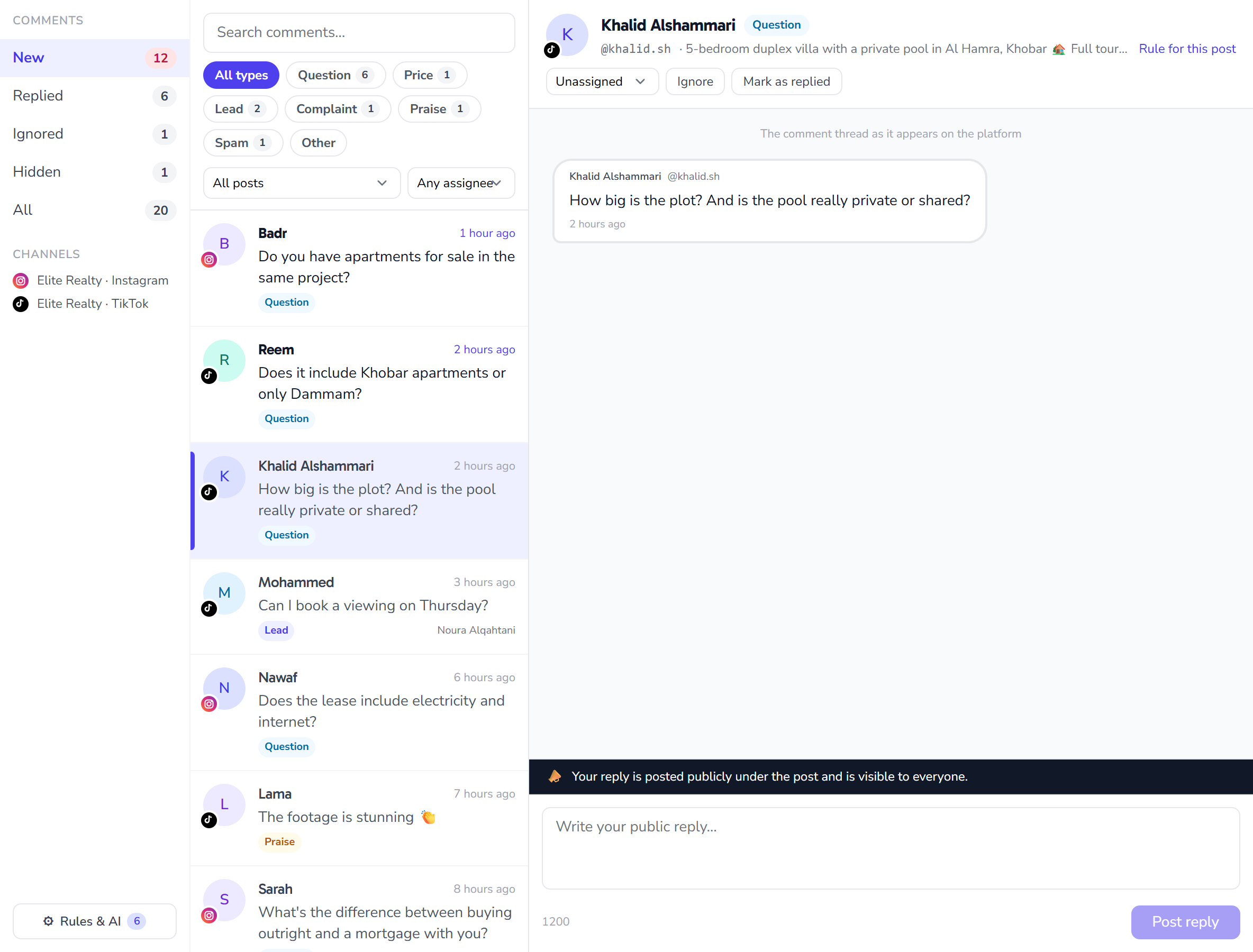
The Comments section gathers the public comments on your social media posts in one page, separate from your conversations inbox. Every reply you write here is posted publicly under the post and is visible to everyone, so a reminder appears above the reply box.
| Platform | How comments arrive | What you can do |
|---|---|---|
| TikTok | Pulled every five minutes | Public reply (up to 1,200 characters) |
| Instantly, with a backup sync every hour | Public reply (up to 2,200 characters), private reply, hide, delete | |
| Google Maps | Reviews are pulled every ten minutes | One reply per review (up to 1,500 characters); a second reply replaces the first |
Comments appear here once the account is connected in Channel settings. Google Maps reviews are connected from the "Google Maps reviews" card on the same page and do not count toward your channel limit.
The page at a glance
- Queues: New, Replied, Ignored, Hidden and All, each with its count.
- Channels: the connected accounts your comments come from.
- Search: across comment text and author names.
- Type chips: every comment is classified automatically as Question, Price, Lead, Complaint, Praise, Spam or Other. Click a type to show only those comments.
- Post and assignee filters: show one post's comments, the ones assigned to you, or the unassigned ones.
- Rules & AI button at the bottom of the page, with the number of active rules.
The platform's main menu shows the number of unread comments next to "Comments".
Replying to a comment
- Pick a comment from the list. The comment thread as it appears on the platform opens: the original comment and every reply under it.
- Write your reply in the box at the bottom and click Post reply.
The thread header shows the post, an "Open post" link and the actions:
| Action | What it does |
|---|---|
| Assign | Assigns the comment to a teammate |
| Ignore | Removes it from New without replying |
| Mark as replied | Moves it to Replied without posting, for example when you answered in the platform's own app |
| Move back to New | Returns a replied or ignored comment to New |
| Rule for this post | Opens a new rule with this post already selected (see Rules below) |
On Instagram only:
- Hide and unhide: a hidden comment is visible only to its author.
- Delete: deletes the comment on the platform itself.
- Private reply: a direct message that lands in the commenter's DMs and opens an inbox conversation when they answer. One private reply per comment, within 7 days of the comment.
AI reply suggestions
When AI is enabled for your account, a Suggest a reply button appears in the composer. It drafts a reply from your company profile and the thread, and nothing is posted until you click. Review and edit the draft before posting.
Rules & AI
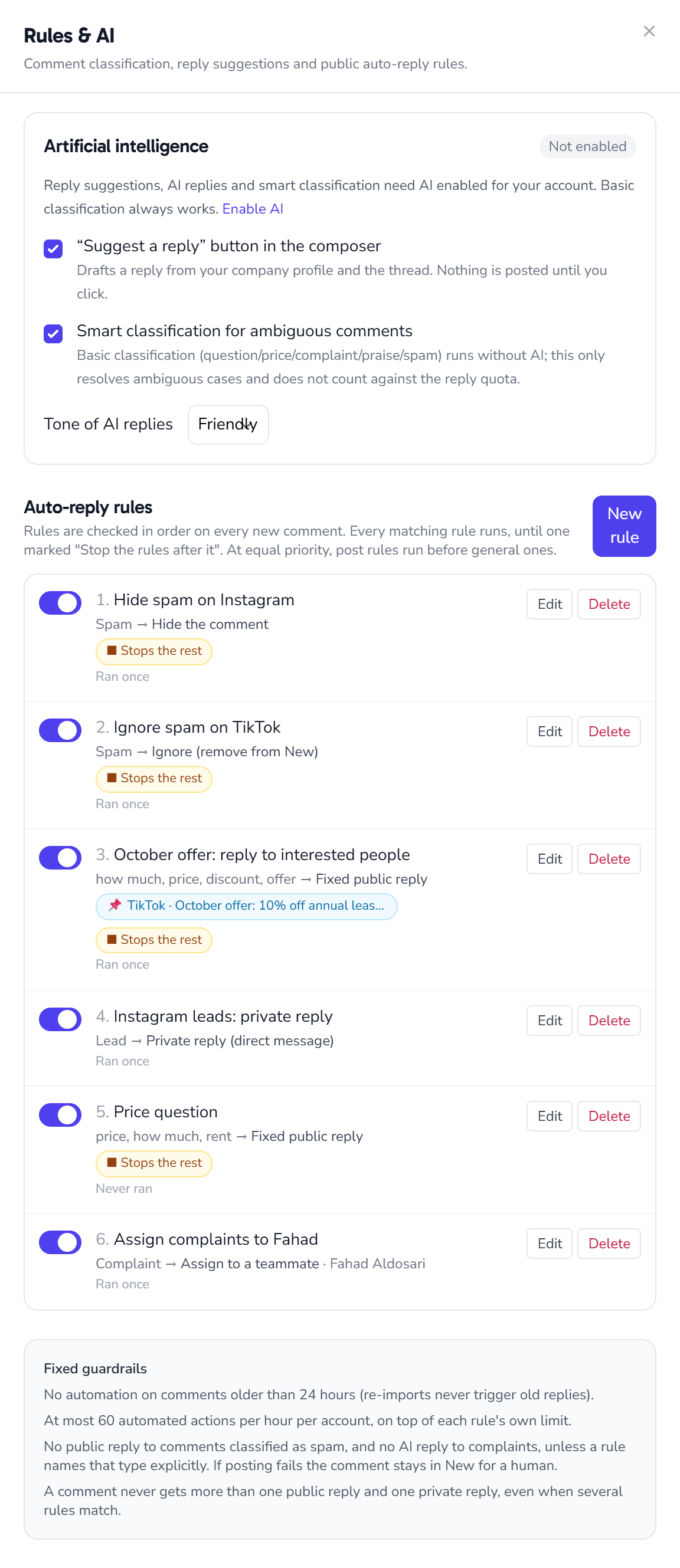
Click Rules & AI to open the panel.
AI settings
| Setting | What it does |
|---|---|
| "Suggest a reply" button in the composer | Shows the suggestion button when replying |
| Smart classification for ambiguous comments | Basic classification always runs without AI; this only resolves ambiguous cases and does not count against the reply quota |
| Tone of AI replies | Friendly or formal |
All three AI features need AI enabled for your account. AI replies to comments count toward the same monthly AI reply quota as your WhatsApp replies.
Auto-reply rules
A rule decides when it applies and what it does with each new comment. Click New rule and fill in:
- Rule name.
- Platform: all platforms or one platform.
- Post: all posts or a single post. The post list shows only the posts of the chosen platform. With a post selected, the rule applies to that post's comments only.
- When it applies:
| Option | Matches |
|---|---|
| Contains a keyword | A comment containing one of the keywords (comma separated) |
| Comment type | One or more classification types: Question, Price, Complaint… |
| Any question | Every comment that looks like a question |
| Every new comment | All comments |
- Action:
| Action | What it does |
|---|---|
| Fixed public reply | Posts text you write; {name} inserts the commenter's name |
| AI public reply | The AI writes the reply from instructions you give the rule (needs AI enabled) |
| Ignore | Removes the comment from New |
| Assign to a teammate | Assigns it to the teammate you choose |
| Hide the comment | Instagram only |
| Private reply (direct message) | Instagram only |
- Also assign to: assigns the comment to a teammate alongside any other action.
- Stop the rules after it: if this rule runs on a comment, the rules after it in the order are not checked.
- Once per commenter per post and Max per hour, per rule.
- Priority: lower numbers are checked first.
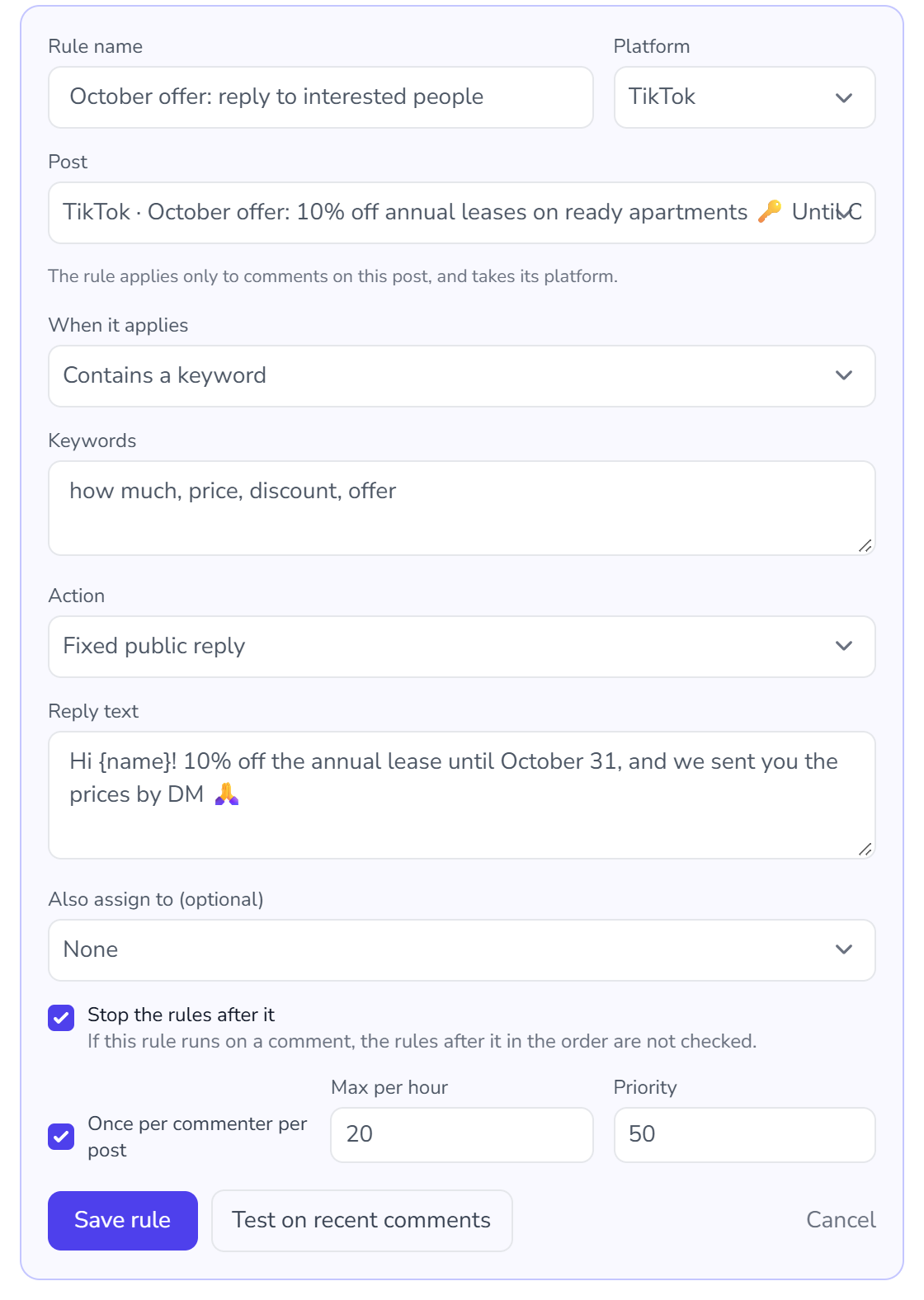
Before saving, click Test on recent comments to see how many recent comments the rule matches, with examples. A rule for a single post is tested on that post's comments.
The order rules run in
- Rules are checked in order on every new comment, and every matching rule runs until one marked "Stop the rules after it".
- The order follows priority. At equal priority, post rules run before general ones.
- The list in the panel is numbered in that same order. Each rule shows a 📌 chip with its post when it targets one, a "Stops the rest" chip when that option is on, and how many times it ran.
- The toggle next to a rule pauses it without deleting it.
Example: a rule for the "October offer" post answers price questions and has "Stop the rules after it" checked. After it comes a general "Price question" rule with a different reply. "How much is the apartment after the discount?" on the offer post gets the offer reply only. A price question on any other post gets the general rule.
Seeing what the rules did
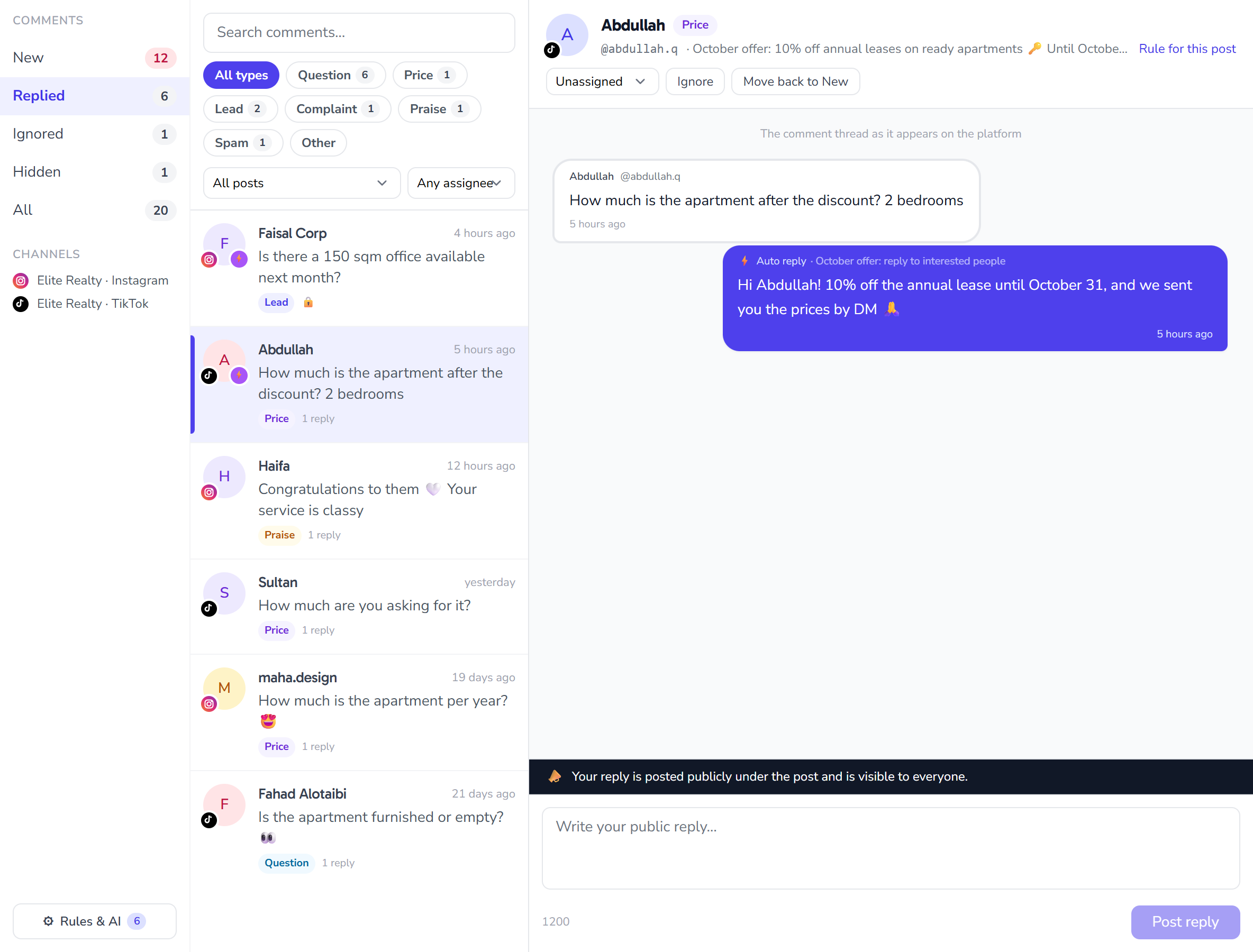
- In the list, a ⚡ mark on the commenter's picture means a rule ran on the comment; hover over it to see the rule's name.
- In the thread, an automatic reply carries ⚡ Auto reply and the name of the rule that posted it.
- A comment whose author was sent a private reply shows a 🔒 icon in the list, and the thread shows the private message that was sent.
Fixed guardrails
These guardrails always apply and cannot be turned off, because replies here are public and carry your business name:
- No automation on comments older than 24 hours, so re-importing comments never triggers old replies.
- At most 60 automated actions per hour per account, on top of each rule's own limit.
- No public reply to comments classified as spam, and no AI reply to complaints, unless a rule names that type explicitly.
- A comment never gets more than one public reply and one private reply, even when several rules match.
- If posting fails on the platform, the comment stays in New for a teammate.