 Fynchat
Sending OTP via the API
Send and verify OTP codes over WhatsApp Business using the Fynchat OTP API.
What is the Fynchat OTP API?
A simple API for sending and verifying one-time codes (OTP) over WhatsApp Business. It sends the code to your customer's number, then verifies the code they entered against a request ID — all through REST requests made from your server.
The base URL for every request:
https://fynchat.com
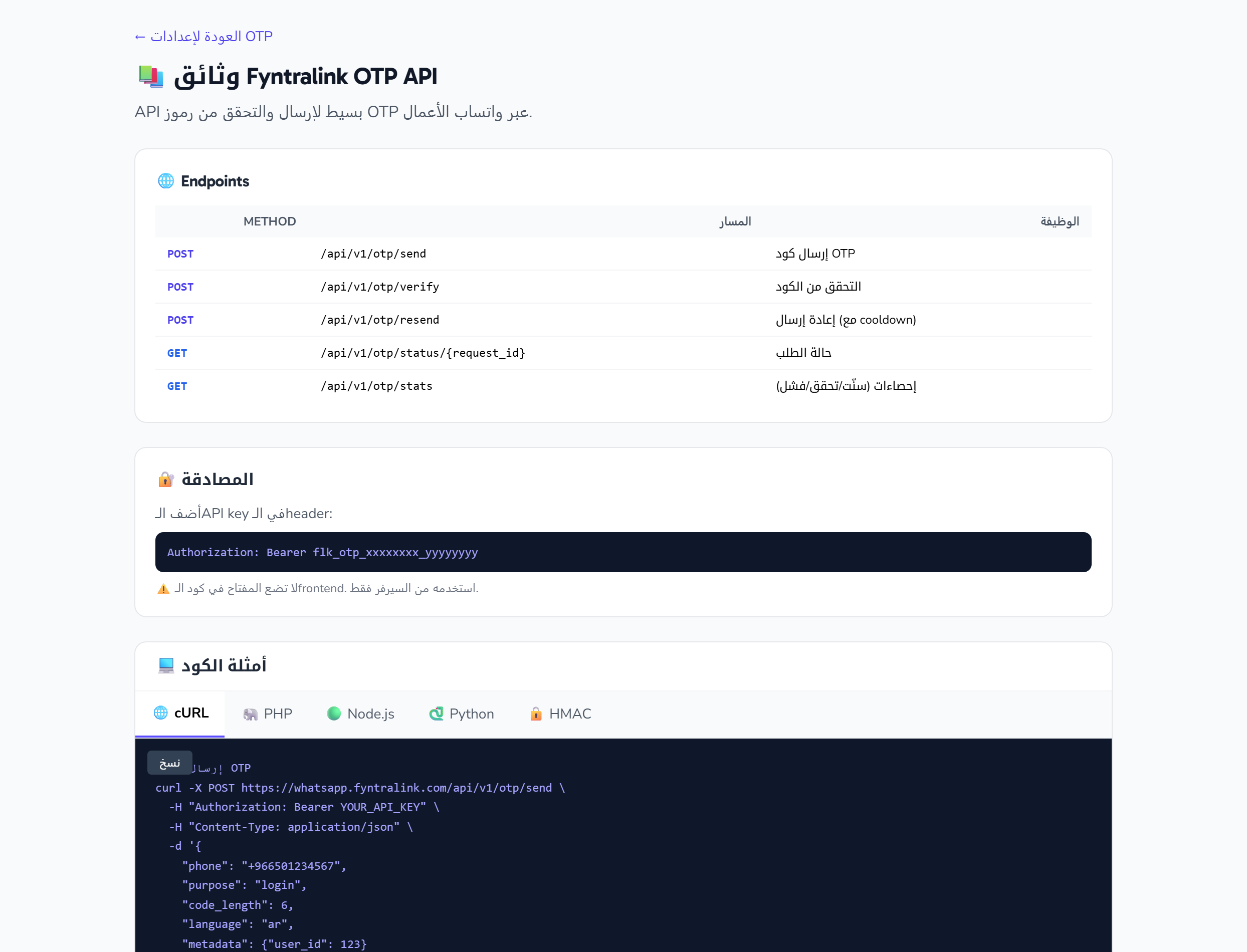
The full documentation page lives inside your dashboard at /settings/otp/docs, and includes ready-to-copy code samples in several languages. The values in the examples (phone number, request ID, key format) are illustrative — replace them with your real values.
Endpoints
| Method | Path | Purpose |
|---|---|---|
POST |
/api/v1/otp/send |
Send an OTP code |
POST |
/api/v1/otp/verify |
Verify the code |
POST |
/api/v1/otp/resend |
Resend (with cooldown) |
GET |
/api/v1/otp/status/{request_id} |
Request status |
GET |
/api/v1/otp/stats |
Statistics (sent / verified / failed) |
Authentication
Every request carries the API key in the Authorization header:
Authorization: Bearer flk_otp_xxxxxxxx_yyyyyyyy
⚠️ Never put the key in frontend code. Use it from your server only.
HMAC signing (optional)
If you enable require_hmac on the key, every request must be signed. Two headers are added — X-Timestamp and X-Signature — and the signature is computed as sha256= followed by hash_hmac('sha256', timestamp . '.' . body, secret).
PHP example:
$timestamp = time();
$body = json_encode(['phone' => '+966501234567', 'purpose' => 'login']);
$signature = 'sha256=' . hash_hmac('sha256', $timestamp . '.' . $body, 'YOUR_HMAC_SECRET');

// Send them in the headers:
// 'X-Timestamp' => (string) $timestamp,
// 'X-Signature' => $signature,
Sending a code (send)
Send a POST request to /api/v1/otp/send with the following fields:
| Field | Description |
|---|---|
phone |
Customer phone number in international format (e.g. +966501234567) |
purpose |
Purpose of the code (e.g. login) |
code_length |
Requested code length (optional; default 6, accepts 4–8) |
language |
Language of the code message (optional; e.g. ar) |
metadata |
Extra data returned as-is in the response (optional; e.g. {"user_id": 123}) |
Example request:
curl -X POST https://fynchat.com/api/v1/otp/send \
  -H "Authorization: Bearer flk_otp_xxxxxxxx_yyyyyyyy" \
  -H "Content-Type: application/json" \
  -d '{
    "phone": "+966501234567",
    "purpose": "login",
    "code_length": 6,
    "language": "ar",
    "metadata": {"user_id": 123}
  }'
Sample response:
{
  "request_id": "550e8400-e29b-41d4-a716-446655440000",
  "status": "pending",
  "phone_masked": "+966***4567",
  "expires_at": "2026-05-22T10:35:00Z"
}
Save the request_id — you'll need it in the verify step.
Verifying a code (verify)
Send a POST request to /api/v1/otp/verify with two fields:
| Field | Description |
|---|---|
request_id |
The request ID returned from the send step |
code |
The code entered by the user |
{
  "request_id": "550e8400-...",
  "code": "123456"
}
On success, the response returns verified along with the phone number and metadata:
{ "verified": true, "phone": "+966501234567", "metadata": {...} }
On a failed verification, the attempts_remaining field (remaining attempts) and an error field explaining the reason are returned.
Ready-made code samples
The documentation page provides a tabbed sample viewer that switches between languages: cURL, PHP, Node.js, and Python, plus an HMAC tab for signing. Click the Copy button to copy the displayed sample to your clipboard.
Error codes
| HTTP | Code | Meaning |
|---|---|---|
401 |
missing_api_key / invalid_api_key |
Missing or invalid key |
401 |
signature_invalid / signature_expired |
Invalid or expired HMAC signature |
403 |
ip_not_allowed / phone_blocked |
IP address not allowed or number blocked |
404 |
request_not_found |
Request ID not found |
410 |
expired |
The code has expired |
429 |
rate_limit_exceeded / cooldown / too_many_attempts |
Limit exceeded — wait retry_after seconds |
400 |
invalid_code |
Wrong code — check attempts_remaining |
502 |
delivery_failed |
Message delivery failed |
Default settings
| Setting | Value |
|---|---|
| Code length | 6 digits (configurable 4–8) |
| Validity | 5 minutes |
| Max verify attempts | 3, then a 15-minute lock |
| Cooldown before resend | 60 seconds |
| Per-minute limit | 60 requests per key |
| Daily limit | 10,000 requests per key |
| Per-number limit | 5 send requests to the same number within 10 minutes |
Back to settings
To configure your key and review the full documentation page, open OTP settings.