 Fynchat
OTP Verification
Create OTP API keys, track your plan and usage, and send verification codes over WhatsApp from one place.
What is the OTP Verification page?
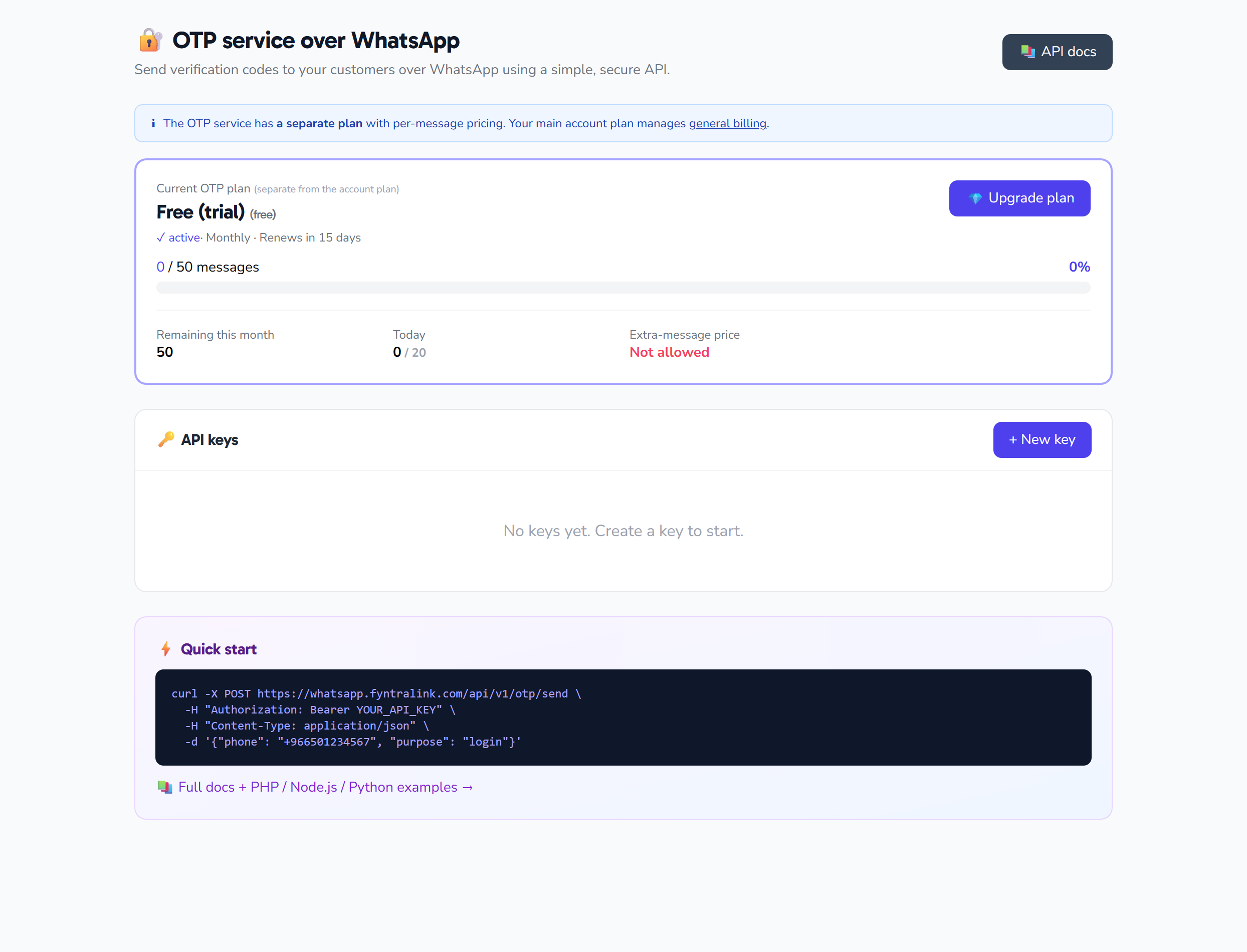
The OTP Verification page is an API console for sending one-time verification codes (OTP) to your customers over WhatsApp. From this page you manage three things:
- Your plan and usage — a read-only card showing your current OTP plan, subscription status, and how much of your quota you've used.
- API keys — create, revoke, and delete keys, and copy the secret that is shown only once.
- Quick start — a ready-made
curlexample to send your first code, with links to the documentation and billing.
Note: This is a developer-facing page that loads its data live from your workspace when you open it, and all keys and subscription information are private to your account alone. Alongside it are two pages: API documentation and Plans & billing.
Plan & usage card (read-only)
At the top of the page, a card summarizes your current subscription. It is read-only and cannot be edited here. It shows:
| Indicator | What it shows |
|---|---|
| Plan and status | The current OTP plan name and subscription status: trial, active, grace, suspended, or cancelled |
| Cycle and reset | The billing cycle (monthly or yearly) and the number of days until the counter resets |
| Usage bar | Messages used this period against the monthly quota, with the percentage |
| Remaining | Messages remaining in the current period |
| Today | Messages used today against the daily ceiling |
| Overage | The number of overage messages and their amount in SAR, plus the price per overage message |
The usage bar changes color to warn you: an amber warning at 80% of the quota, and a red warning at 100%.
API keys
An API key is what lets your system call the OTP send endpoint. The table lists your existing keys and their status (active or revoked).
Create a new key
Click Create API key to open the modal, then configure these fields:
| Field | What it means | Value |
|---|---|---|
Key name (name) |
Text that identifies the key; the Create button stays disabled until you fill it | Required, up to 120 characters |
Allowed IPs (allowed_ips) |
An allowlist of IP addresses or CIDR ranges, written comma-separated | Optional (example: 1.2.3.4, 5.6.7.0/24) |
Rate limit per minute (rate_limit_per_minute) |
Maximum requests for this key per minute | A number from 1 to 10000, default 60 |
Rate limit per day (rate_limit_per_day) |
Maximum requests for this key per day | A number from 1 to 1000000, default 10000 |
Require HMAC (require_hmac) |
A checkbox that forces requests to be signed with HMAC | Off by default |
Save the secret now — it's shown once
After creation, the API Key — and, if you enabled HMAC, the HMAC Secret alongside it — appears in a green panel with copy buttons and a warning that you will not be able to view it again. Copy and store it safely before closing the panel. Keys with HMAC enabled show a 🔒 HMAC badge in the table.
Revoke or delete a key
- Revoke — shown only for active keys; after you confirm, the key becomes inactive and its status changes to "revoked". Use it if a key leaks or is no longer in use.
- Delete — after you confirm, the key is permanently removed.
Quick start
The page shows a ready-made example to send your first verification code. Replace YOUR_API_KEY with your key:
curl -X POST https://fynchat.com/api/v1/otp/send \
  -H "Authorization: Bearer YOUR_API_KEY" \
  -H "Content-Type: application/json" \
  -d '{"phone": "+966501234567", "purpose": "login"}'
For the full reference of every endpoint, open the API documentation.
Plans & billing
From the Plans & billing page you choose an OTP plan and manage your subscription:
- Cycle (monthly / yearly) — a toggle that switches all displayed prices between monthly and yearly, and shows a savings badge when you pick yearly.
- Subscribe / upgrade / downgrade — each plan has a button reflecting your state (current plan, upgrade, downgrade, free, or subscribe). Downgrading to a lower quota asks for confirmation. Each plan card shows the monthly quota, daily ceiling, burst per minute, overage price (or "unavailable"), and a feature checklist: a Bearer API key, Webhook callbacks, HMAC signature, priority support, and SLA 99.9%.
- Overage — a button to enable or disable pay-per-message billing beyond your quota. The button is disabled if your current plan doesn't allow overage.
- Cancel renewal at period end — after you confirm, cancellation is scheduled for the end of the current period, and service continues until then. The button then becomes disabled with a "scheduled" label.
What this page does not configure
The behavior of the OTP message itself — the template, message language, code length, validity period, and number of allowed attempts — is not set from this page; its default values live in the server configuration. The current defaults are:
- Template:
otp_code - Message language: Arabic
- Validity: 5 minutes
- Code length: 6 digits
- Maximum attempts: 3
That said, the send API accepts two optional per-request parameters: language (ar or en) and code_length (4 to 8).
The only configuration you can edit from this page is per-API-key: the name, allowed IPs, rate limits, and the HMAC requirement.
Quick tips
- Copy the key and secret the moment they appear — they can't be retrieved after you close the panel.
- Restrict allowed IPs for production keys to reduce the risk of misuse.
- Watch the usage bar; at 80%, consider upgrading or enabling overage before the quota runs out.
- Revoke any key that's no longer used or that you suspect has leaked, rather than leaving it active.