 Fynchat
Privacy and customer data
From one page, configure your company's privacy details, track contact metrics, and action data-subject requests in line with the Personal Data Protection Law (PDPL).
What is the Privacy and customer data page?
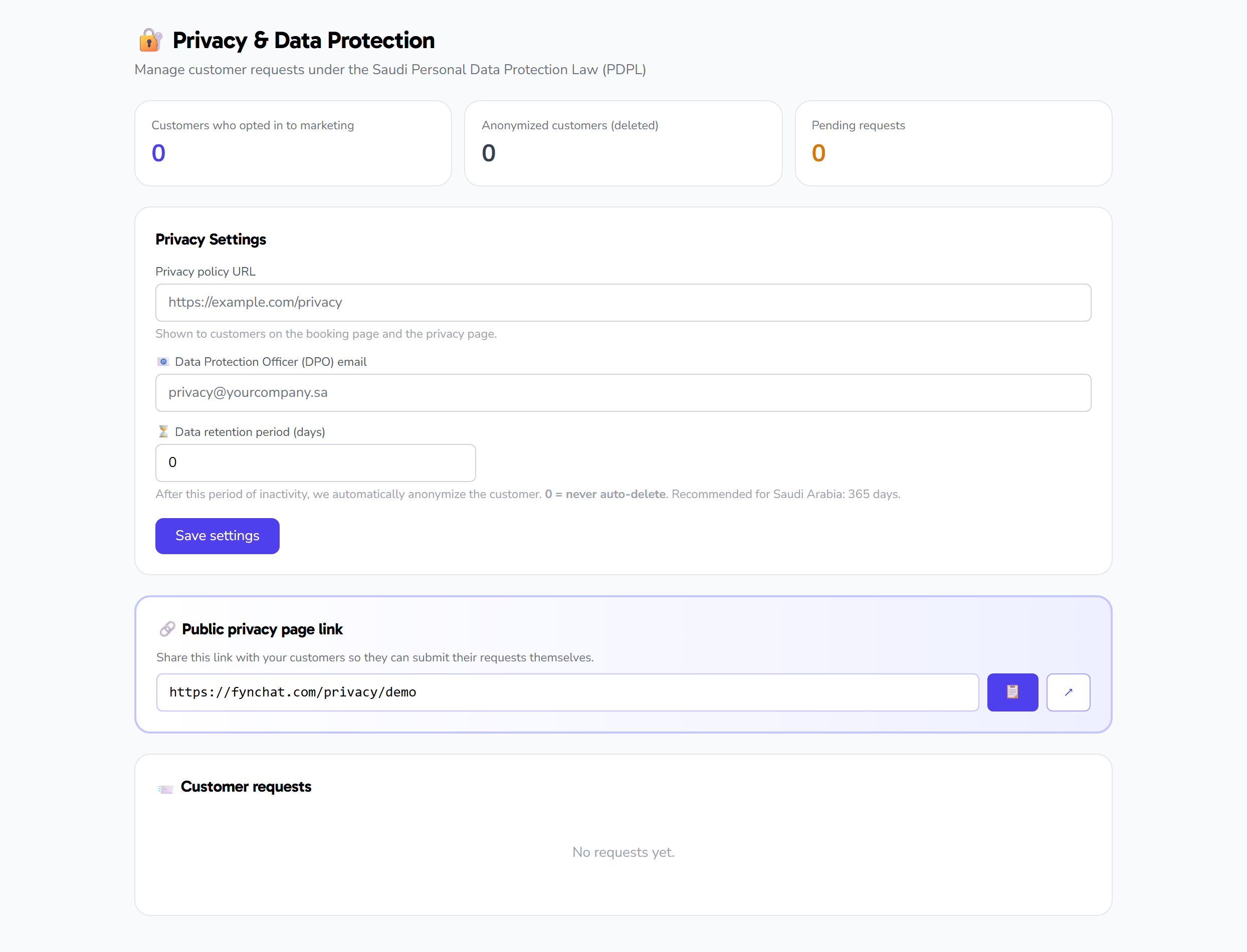
The Privacy and customer data page (/settings/privacy) is an account-level dashboard that helps you comply with the Personal Data Protection Law (PDPL). From one place you configure your company's core privacy details, track contact metrics, and receive and action data-subject requests.
The page has three parts:
- Editable privacy settings — privacy policy URL, Data Protection Officer email, and data retention period.
- Read-only metrics and a public link — three counters for contacts and requests, plus your public privacy page URL.
- Data-subject requests — a queue from which you fulfil delete, access, withdraw-consent, and rectify requests.
Note: This page is account-level (Admin) and isolated per account. It requires a signed-in user with a verified email, a connected WhatsApp, and an active subscription. All settings, metrics, and requests belong to your account only — you cannot access another account's data.
Privacy settings
The page has three fields you can edit and save:
| Field | What it means | Constraints |
|---|---|---|
| Privacy policy URL | A link to your company's privacy policy page | Optional, a valid URL, up to 500 characters. Example: https://example.com/privacy |
| DPO (Data Protection Officer) email | The email of your data protection officer | Optional, a valid email, up to 255 characters. Example: [email protected] |
| Data retention period (days) | How many days you keep data | An integer between 0 and 3650 (up to 10 years). Defaults to 0 |
After editing any field, click Save to store the values on your account. A confirmation message appears on success, and an alert appears if the save fails.
Public privacy page URL
Alongside the editable settings, the page shows your account's public privacy page URL as read-only (it cannot be edited). The link is built automatically in the form:
<platform-url>/privacy/<your-account-slug>
Two buttons sit next to the link:
- Copy — copies the link to the clipboard, with a confirmation message after copying.
- Open — opens the public privacy page in a new tab.
Metrics (read-only)
Three counter cards give you a quick overview and cannot be edited:
| Metric | What it counts |
|---|---|
| Subscribed contacts | Contacts that granted marketing consent, have not revoked it, and are not yet anonymized |
| Anonymized contacts | Contacts whose data has been anonymized |
| Pending requests | Data-subject requests currently in the "pending" status |
Data-subject requests
At the bottom of the page is the data-subject requests queue (up to 100 requests, pending shown first). Each request has a type and a status, and you can fulfil or reject it.
Request types
| Type | Meaning |
|---|---|
| Delete (delete) | A request to delete the contact's data |
| Access (access) | A request for a copy of the contact's data |
| Withdraw marketing consent (withdraw_marketing) | A request to unsubscribe from marketing |
| Rectify (rectify) | A request to correct data |
Statuses
A request moves through the statuses: pending, processing, completed, failed.
Fulfilling a request
A Fulfil button appears for each pending request, but it is disabled until the request is verified. When you fulfil, the system asks for confirmation, then acts based on the request type:
| Request type | What happens on fulfilment |
|---|---|
| Delete | Anonymizes the contact's data |
| Access | Exports the contact's data; it is saved on the request and shown in a JSON dialog you can view and download |
| Withdraw marketing consent | Unsubscribes the contact and records the consent-revoked time |
| Rectify | Manual note only (you handle it manually) |
On success, the request status changes to completed, with the completion time recorded and a note added that an admin fulfilled it. If an error occurs during fulfilment, the status changes to failed.
Rejecting a request
Instead of fulfilling, you can reject a request. The system asks you to enter a reason, then marks the request failed, records the completion time, and adds a note with the reason (or "no reason" if you leave it blank). The request moves to the "failed" status in the list.
Viewing and downloading an access export
After fulfilling an access request, a dialog opens showing the contact's data as JSON. You can download it as a file named contact-export-<timestamp>.json.
API-only tools
The system also provides two per-contact actions, but they have no button on this page (available via the API only):
- Export a single contact — returns the contact's data.
- Anonymize a single contact — anonymizes the contact's data and returns a summary.
Both are scoped to your account; you cannot reach another account's contacts.
Quick tips
- Fill in the privacy policy URL and DPO email so your company's public privacy details are complete.
- Verify the requester's identity first; the Fulfil button stays disabled until the request is verified.
- Remember that a Delete request is carried out by anonymization, not permanent deletion.
- When rejecting, you can add a reason — it is optional and is recorded in the request's notes (if left blank, "no reason" is recorded).
- Use the Copy / Open buttons to quickly share or review your public privacy page URL.